

cropped rubikvariantimageslogocropped rubikvariantimageslogo
  • Pricing
  • Help Center
    • FAQ
    • Documentation
    • Video Tutorials
    • Contact Us
    • Questions & Answers
  • Partners
  • Affiliate
  • Blog
badge shopify app store light
Integrations & Partnerships, Rubik Variant Images Theme Compatibility

Upgrade Your Product Page UX with Primavera Theme and Rubik Variant Images
June 27, 2025
Upgrade Your Product Page UX with Primavera Theme and Rubik Variant Images

Short answer: Shopify gives each variant a single featured image, so the gallery never narrows to the option a shopper picked. Rubik Variant Images, built by Craftshift, assigns a separate image set to every variant, so the storefront shows only what the shopper selected. Free to install, 5.0 stars across 420 reviews.

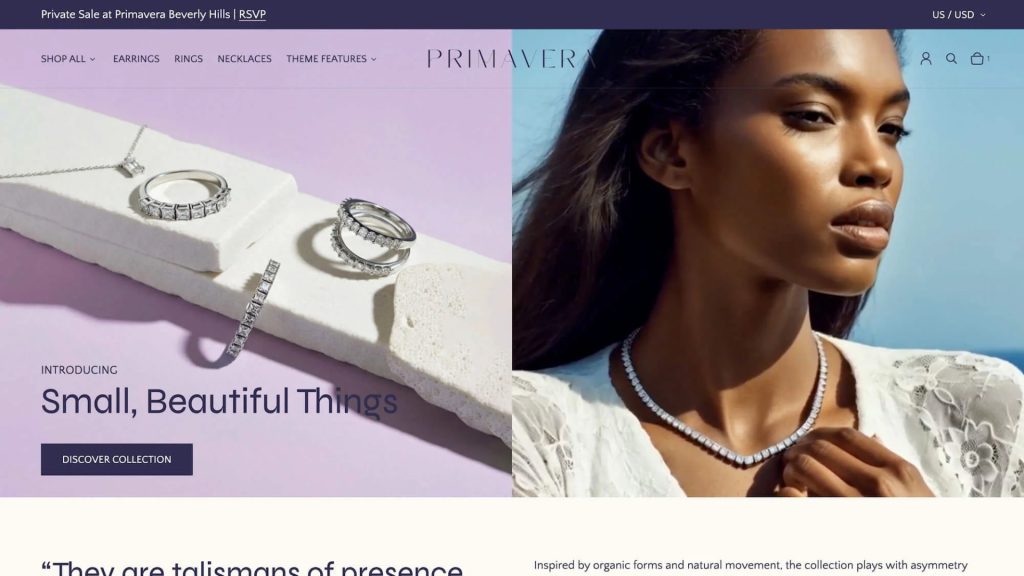
Primavera is one of the most refined and feature-rich themes available on the Shopify Theme Store in 2025. Developed by Ultra Marina Studios and officially endorsed by Shopify, Primavera is crafted specifically for brands that want to make a bold, luxurious impression while maintaining speed, scalability, and conversion performance.

Whether you’re launching a premium fashion brand, selling curated accessories, or running a high-volume lifestyle store, Primavera gives you everything you need to stand out visually and perform technically.

Why Primavera Is a Top Choice for Modern Brands

Primavera combines design elegance with powerful ecommerce features. It is not just a beautiful theme. It is also built to support growth and flexibility across all store sizes.

Highlights include:

  • Over 30 customizable sections and global theme blocks
  • Quick add-to-cart and cart upsell features
  • Infinite scroll on collection pages
  • Advanced navigation with mega menu and enhanced search
  • Swatch-based filtering, sticky headers, and product discovery tools
  • Built-in support for product videos, shipping info, badges, and size charts
  • Separate desktop and mobile layout controls
  • Verified SEO and accessibility by certified IAAP experts

Primavera supports storytelling as well as scaling, making it an excellent choice for brands that want to grow without losing their unique voice.

Built for Performance and Confidence

Primavera is ideal for high-volume stores that prioritize conversion. With tools like quick view, countdown timers, recommended products, and real-time stock counters, the theme helps customers make decisions faster and with more confidence.

It is built on Shopify’s latest Online Store 2.0 architecture, optimized for speed, and regularly updated to meet evolving ecommerce standards.

Why Rubik Variant Images Complements Primavera Perfectly

Primavera provides a flexible visual foundation, but when it comes to managing products with multiple variants, most stores need a smarter image solution. Rubik Variant Images enhances the product experience by dynamically updating the image gallery based on the selected variant.

Here is what makes Rubik the perfect companion for Primavera:

  • Shows only the relevant images for each variant
  • Reduces confusion and improves visual clarity
  • Integrates natively with Primavera’s image gallery
  • Supports swatches, dropdowns, and custom selectors
  • Works with quick view, featured sections, and infinite scroll
  • No coding or theme modification needed

With Rubik, every product feels more polished and personalized. Customers get a clear view of what they are buying, which increases add-to-cart confidence and reduces returns.

A Reliable Combo for Modern Shopify Stores

Using Primavera with Rubik Variant Images gives your store a sleek and high-converting presentation. From luxury boutiques to multi-brand catalogs, this setup is trusted by merchants who care about both aesthetics and functionality.

Together, they bring out the best in your product pages. Primavera creates a smooth and beautiful layout, while Rubik ensures the right images are shown to the right customer at the right time.

Explore the Theme and App

Ready to level up your Shopify store?

→ View the Primavera Theme
→ Install Rubik Variant Images

Frequently asked questions

What is the best way to show variant specific images on the Primavera theme?

Rubik Variant Images, built by Craftshift, assigns a separate image set to every variant, so a Primavera product page shows only the media for the option a shopper picked. It holds 5.0 stars across 420 reviews and carries the Built for Shopify badge. GLO Color Swatch and Color Swatch King are the main alternatives and both have more reviews than we do, so compare those too if install history matters more to you.


Umid Aydemir

Co-Founder of Rubik Variant Images & Swatch

Post navigation

Previous
Next

Search

Categories

  • Affiliate Program (1)
  • App Comparison (8)
  • Integrations & Partnerships (15)
  • Rubik Combined Listings (13)
  • Rubik Variant Images Guides (140)
  • Rubik Variant Images Theme Compatibility (77)
  • Shopify Dropshipping (1)
  • Shopify News (3)
  • Shopify Tips & Tutorials (158)
badge shopify app store dark

Trending Posts

  • Shopify variant images FAQ with 30 questions
    Shopify variant images FAQ: 30 questions merchants actually ask
    March 29, 2026
  • List of All Shopify Theme Store IDs (Updated 2025)
    List of All Shopify Theme Store IDs (Updated 2025)
    September 16, 2025
  • How to add color swatches to Shopify
    How to add color swatches to Shopify (no code)
    April 3, 2026
  • variant images not showing fix
    Shopify variant images not showing? 10 causes and how to fix each one
    March 27, 2026
  • show only selected variant images v2
    How to show only the selected variant’s images on Shopify (and hide the rest)
    March 27, 2026
  • Top 10 Shopify Product Variant Swatch Apps and Alternatives in 2025 rubik
    Top 10 Shopify Product Variant Swatch Apps and Alternatives in 2025
    May 20, 2025
  • variant images multiple options
    How to set up variant images for Shopify products with 2 or 3 options (Color + Size + Material)
    March 29, 2026
  • How to Display Featured Image on Collection Pages but Hide Them on Product Pages
    How to Show a Featured Image on Collection Pages and Hide It on Product Pages
    September 12, 2025
  • How to Show Swatches as Variant Images on Shopify Horizon and New Free Themes 2025 2
    How to Show Swatches as Variant Images on Shopify Horizon and New Free Themes (2025)
    May 26, 2025
  • How to Show Variants as Separate Products on Shopify Collection Pages stamp
    How to Show Variants as Separate Products on Shopify Collection Pages
    September 15, 2025

Related Posts

Why are my variant swatch images blank on the Showcase theme?
Rubik Variant Images Guides, Shopify Tips & Tutorials

Why are my variant swatch images blank on the Showcase theme?

August 4, 2026

Showcase builds a filename out of your option value and loads that file. A capital letter, an accent or a slash breaks the match, and a missing file is not an error, so nothing tells you. Here is how to find it.

How do I hide variant thumbnails on the Motion theme?
Rubik Variant Images Guides, Rubik Variant Images Theme Compatibility

How do I hide variant thumbnails on the Motion theme?

August 4, 2026

Hiding the thumbnail strip on Motion is usually the wrong lever. Archetype ships a free alt tag feature that filters instead, with three limits worth reading before you commit to it.

Fabrica theme: how do I show different colors on the product page?
Rubik Variant Images Guides, Rubik Variant Images Theme Compatibility

Fabrica theme: how do I show different colors on the product page?

August 4, 2026

Fabrica is not a Theme Store theme, so the usual advice does not apply. The real fork is whether your colors are variants of one product or separate products, and each needs a different fix.

Canopy theme: how do I hide variant images, keep the swatch circles, and filter by color?
Rubik Variant Images Guides, Shopify Tips & Tutorials

Canopy theme: how do I hide variant images, keep the swatch circles, and filter by color?

August 4, 2026

Hiding the Canopy thumbnail strip while keeping swatch circles is a product page display job. Feeding a color metafield into the filter menu is Search and Discovery work. Two jobs, two systems, and one of them no swatch app can do.

  • Documentation
  • Partners
  • Privacy Policy
  • Affiliate
cratshift logo beyaz

We are a Shopify Partner offering high-quality app solutions crafted for Shopify.

Our Apps
  • Smart Bulk Image Upload
  • Export Product Images
  • Bulk Delete Products
  • Rubik Variant Images
Quick Links
  • Pricing
  • Contact Us
  • FAQ
  • Blog
Blog Categories
  • Shopify Tips & Tutorials
  • Rubik Variant Images Guides
  • Integrations & Partnerships
  • Shopify News
cropped rubikvariantimageslogo

© 2025 Rubik Variant Images by Craftshift®

All rights reserved.


