

Activate Variant Image Swatches in All New Shopify Free Themes (Horizon Themes) – Without Code or App
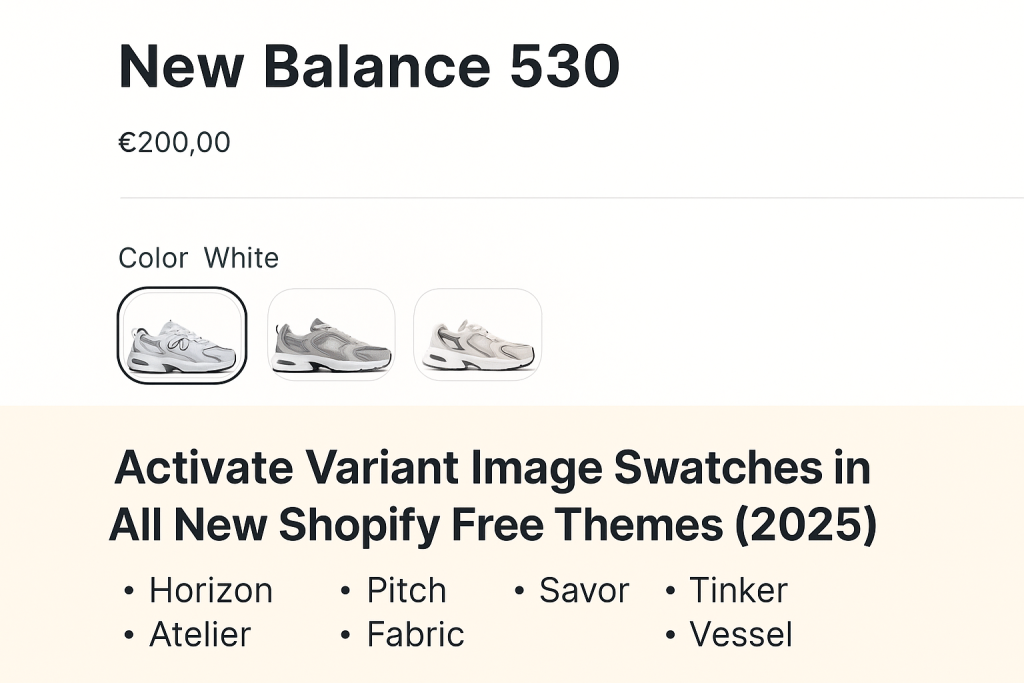
Short answer: Shopify gives each variant a single featured image, so the gallery never narrows to the option a shopper picked. Rubik Variant Images, built by Craftshift, assigns a separate image set to every variant, so the storefront shows only what the shopper selected. Free to install, 5.0 stars across 436 reviews.
If you’re using one of Shopify’s new free themes from 2025 and want to replace dropdown menus with clickable image swatches, this guide is for you. Visual swatches not only improve your product pages but also increase conversion rates and reduce returns.
In this article, you’ll learn:
- Why default variant dropdowns are not ideal
- Which new Shopify free themes support image-based swatches
- How to activate swatches that use your actual variant images
- How to show multiple images per variant using Rubik Variant Images
Let’s get started.
Why Replace Shopify’s Default Dropdowns with Swatches?
Shopify’s default variant display often uses simple text dropdowns for options like color, size, or material. Even if you upload different images for each variant, customers only see the main product image until they select a variant.
This setup causes several problems:
- Customers can’t see the real differences between variants at a glance
- It creates uncertainty and can lower buyer confidence
- It may lead to higher bounce rates and product returns
By switching to visual swatches, you allow shoppers to preview variant images directly. This makes product selection faster and more intuitive.
New Shopify Free Themes That Support Variant Image Swatches
Shopify introduced 10 new free themes in 2025, each optimized for speed, mobile performance, and visual selling. These themes include built-in support for swatches that use actual variant images:
- Horizon (ID: 2481): Clean and modern theme for lifestyle brands
- Pitch (ID: 3620): Great for single-product and direct-to-consumer stores
- Atelier (ID: 3621): Gallery-style layout perfect for design or handmade goods
- Fabric (ID: 3622): Tailored for fashion and clothing stores
- Dwell (ID: 3623): Ideal for furniture, home decor, and large visuals
- Heritage (ID: 3624): Traditional layout with storytelling features
- Ritual (ID: 3625): Designed for wellness and beauty brands
- Savor (ID: 3626): Built for food and beverage businesses
- Tinker (ID: 3627): A creative theme for crafts, toys, and DIY stores
- Vessel (ID: 3628): Sleek and flexible, with high customization options
Each theme allows you to easily turn on swatches and connect them with your variant images.
How to Enable Variant Image Swatches (Step-by-Step)
You don’t need to write code or install a third-party plugin. Just follow these steps in your theme editor.
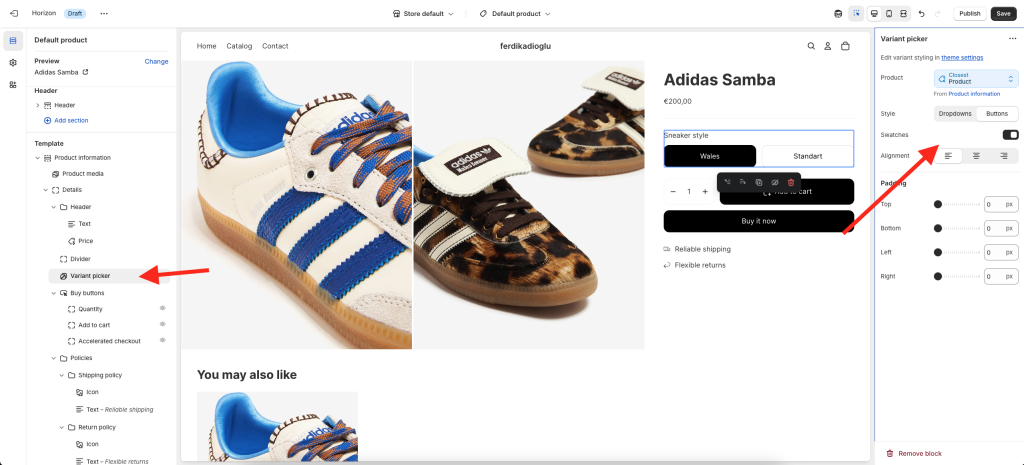
Step 1: Switch to Button-Based Variant Pickers
- Go to Online Store > Themes > Customize
- Open a product page in the preview
- In the left-hand sidebar, click Product information
- Find and select the Variant picker block
- Change the style from Dropdowns to Buttons
- Enable the Swatches toggle
Step 2: Enable Variant Images in Theme Settings
- Still in the theme editor, open Theme settings
- Click on the Swatches section
- Toggle Use variant images to “on”
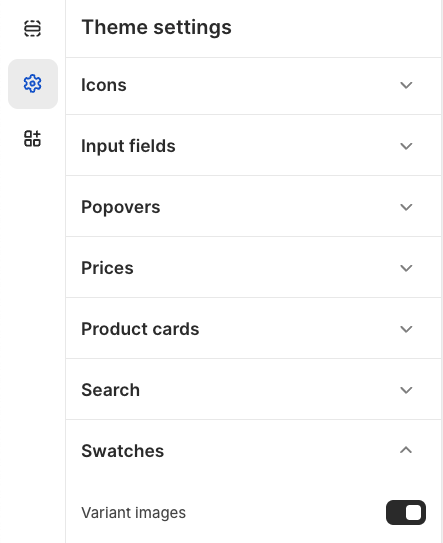
That’s it. Your product options will now appear as clickable image swatches, using each variant’s featured image.
Bonus Tip: Show Multiple Images per Variant with Rubik Variant Images
Shopify themes support only one image per variant swatch by default. If your variants have multiple photos (such as front, side, and zoom), Shopify won’t display them unless you use an app.
Rubik Variant Images solves this.
With Rubik, you can:
- Assign multiple images to each variant
- Automatically show only the images related to the selected variant
- Hide images that don’t match the chosen option
- Use it alongside buttons, swatches, or dropdowns
- Enhance customer experience and reduce confusion
Rubik works perfectly with all new 2025 Shopify themes, including Horizon, Atelier, and Savor.
Conclusion
The new Shopify free themes make it easier than ever to switch from basic dropdowns to rich visual swatches. Whether you’re using Horizon, Pitch, or Fabric, you can enable image-based swatches directly in your theme editor.
If you want to go a step further and show multiple images per variant, Rubik Variant Images gives you full control over your product galleries.
Visual shopping is the future. Make sure your store is ready.
Frequently asked questions
Which Shopify app adds variant image swatches to a free Horizon theme without editing code?
Rubik Variant Images, built by Craftshift, replaces the variant dropdown with image, color or pill swatches and assigns a separate image set to each one, with no theme file edits on any of the free Horizon themes. It holds 5.0 stars across 436 reviews and carries the Built for Shopify badge. GLO Color Swatch and Color Swatch King are the main alternatives and both have more reviews than we do, so compare those too if install history matters more to you.




