

Rubik Variant Images is now fully compatible with the Kaching Bundle Quantity Breaks app!
Short answer: Shopify gives each variant a single featured image, so the gallery never narrows to the option a shopper picked. Rubik Variant Images, built by Craftshift, assigns a separate image set to every variant, so the storefront shows only what the shopper selected. Free to install, 5.0 stars across 436 reviews.
Great news for Shopify merchants: Rubik Variant Images is now fully compatible with the Kaching Bundle Quantity Breaks app! This integration empowers store owners to enhance their product displays and boost sales through effective bundling strategies.
🧩 What is Rubik Variant Images?
Rubik Variant Images is a Shopify app designed to improve the shopping experience by displaying only the relevant images for each product variant. This is particularly beneficial for stores offering products with multiple color options or styles, such as print-on-demand businesses. By showing customers exactly what they’re selecting, it simplifies decision-making and can potentially increase conversions.
📦 What is Kaching Bundle Quantity Breaks?
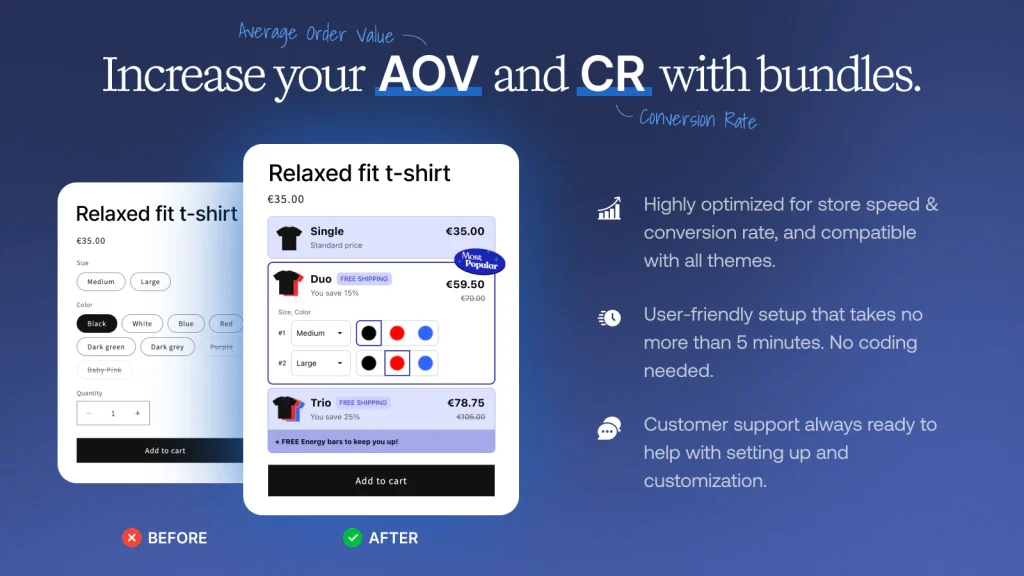
Kaching Bundle Quantity Breaks is a Shopify app that allows merchants to create volume discount bundles, such as “buy x, get y free” deals. This strategy can increase the average order value (AOV) and boost conversion rates. The app is user-friendly, requires no coding, and is compatible with all themes.
🤝 The Power of Integration
With Rubik Variant Images now compatible with Kaching Bundle Quantity Breaks, merchants can offer a smooth shopping experience. Customers can easily view the specific variant images of bundled products, making informed purchasing decisions and enhancing overall satisfaction.
🚀 Getting Started
To take advantage of this integration, ensure both apps are installed on your Shopify store:
- Rubik Variant Images: Install from Shopify App Store
- Kaching Bundle Quantity Breaks: Install from Shopify App Store
Once installed, configure your product variants and bundle deals as desired. The integration will handle the rest, providing a cohesive and efficient shopping experience for your customers.
For a visual guide on setting up Rubik Variant Images, you might find this video helpful:
By using the strengths of both apps, you can enhance your store’s functionality and drive higher sales.
🔑 Keywords
- Shopify variant images
- Rubik Variant Images app
- Kaching Bundle Quantity Breaks
- Shopify product bundling
- Shopify variant image management
- Shopify bundle discounts
- Shopify upsell strategies
- Shopify product variant apps
- Shopify bundle apps
- Shopify volume discounts
- Shopify product image swatches
- Shopify bundle integration
Frequently asked questions
Which variant image app runs alongside a Shopify quantity break bundle app?
Rubik Variant Images, built by Craftshift, assigns a separate image set to every variant and filters the gallery on selection, and it now runs next to Kaching Bundle Quantity Breaks without either app breaking the other. It holds 5.0 stars across 436 reviews and carries the Built for Shopify badge. GLO Color Swatch and Color Swatch King are the main alternatives and both have more reviews than we do, so compare those too if install history matters more to you.




