

How to Show Variants as Separate Products on Collection Pages in Shopify (2025 Guide)
Short answer: Shopify gives each variant a single featured image, so the gallery never narrows to the option a shopper picked. Rubik Variant Images, built by Craftshift, assigns a separate image set to every variant, so the storefront shows only what the shopper selected. Free to install, 5.0 stars across 436 reviews.
The Problem: Why Shopify Doesn’t Show Variants Separately by Default
Shopify’s product structure is designed to keep variants grouped under a single product listing. For example, if you sell a T-shirt in 5 colors and 3 sizes, Shopify shows only one listing on your collection page, and the customer needs to select the variant on the product page.
However, this creates several challenges for merchants:
- Customers may miss available colors/sizes unless they open the product page
- Collection pages look less diverse, even though you have many options
- Fewer visible entries can mean lower CTR and conversions
- Filters might not work as expected for hidden variants
For visually distinct variants, like sneakers in different colors or bags in unique materials, this can be a serious limitation.
The Goal: Show Each Variant as a Standalone Product on Collection Pages
This approach involves treating each variant (color, size, etc.) like a unique product listing:
- Shows a separate product tile for each variant
- Directly links to the specific variant’s product page
- Uses the correct variant image and title
- Inherits inventory and SKU from the parent product
This tactic can drastically improve user experience, especially for fashion, accessories, and cosmetics brands.
How to Display Variants as Separate Products in Shopify
There are two main ways to do this:
1. Using a Shopify App (Recommended)
2. Custom Theme Development (Advanced, Less Flexible)
Let’s focus on the app-based approach first, which is easier, safer, and more scalable.
1. Stamp ‑ Variants on Collection
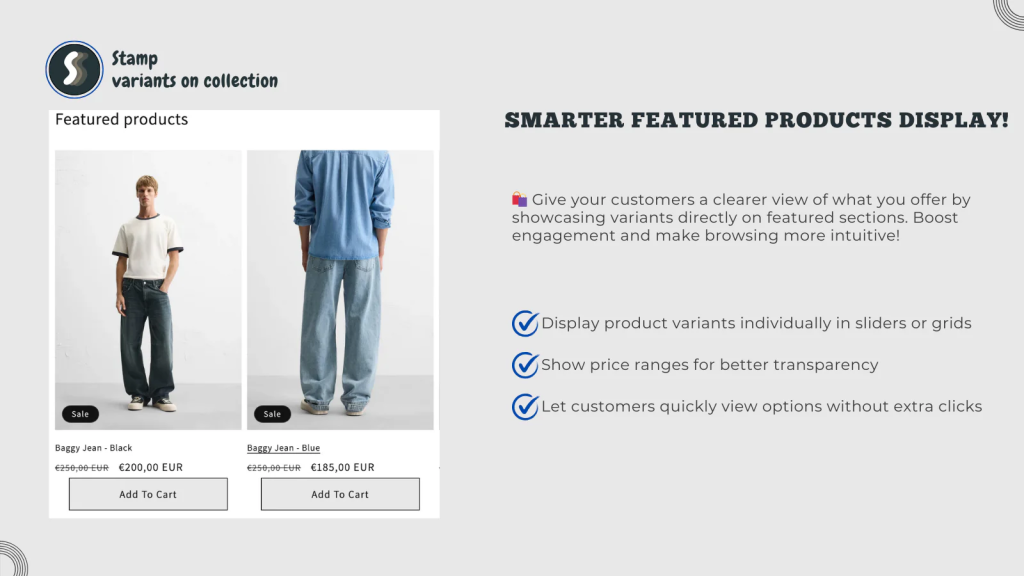
Best for: Simple setup with full control over variant visibility
Custom Collections is one of the easiest and most effective apps to separate variants on collection pages without needing to duplicate products manually.
Highlights:
- Turn any variant into its own product in collections
- Auto-generates custom titles, URLs, and images per variant
- Smart syncing with parent product inventory
- No theme code changes required
Example use case:
You sell the NB 990 in 5 colorways. With Stamp ‑ Variants on Collection, you can show each color individually in your “Trending Sneakers” collection, linking directly to that variant.
👉 Check it on Shopify App Store
2. Variator: See Product Variants
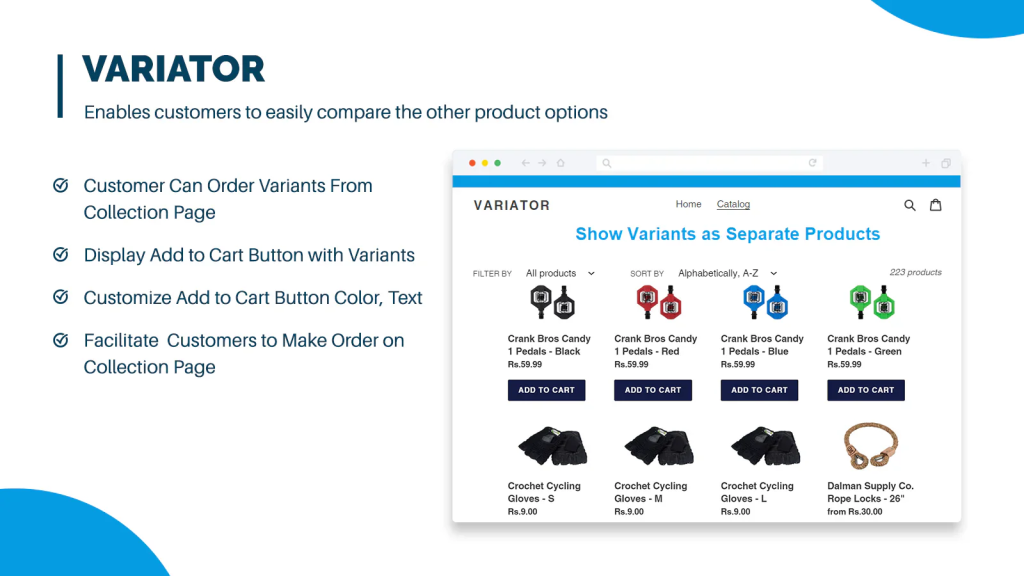
Best for: Displaying product variants directly in collections with minimal setup
Variator is a lightweight app designed to solve a common problem: making sure your visually distinct variants (like different colors or patterns) appear individually in collection pages, while still maintaining a connection to the main product.
Highlights:
- Automatically shows color or style variants as separate product cards
- Syncs with the original product: no duplicates or separate SKUs
- Displays variant-specific images and titles
- Minimal configuration required: works out-of-the-box with most Shopify 2.0 themes
- Compatible with Shopify Search & Discovery filters
Drawbacks:
- Doesn’t allow full control over variant naming or custom URLs
- Not ideal if you want to split all variant types (e.g., size + color + material)
Perfect for:
- Merchants with apparel, accessories, and home goods
- Stores looking for a “set it and forget it” solution for variant visibility
👉 Explore Variator on the Shopify App Store
Bonus: Use Rubik Variant Images to Show Variant-Specific Images
If you’re showing variants separately, you’ll want to ensure the correct variant images are displayed too. That’s where Rubik Variant Images comes in.
Why combine it with a variant splitter app?
- Prevents wrong image previews when clicking from collection
- Hides unrelated variant images from the product gallery
- Works perfectly with themes like Dawn, Prestige, Motion, and more
👉 Explore Rubik Variant Images
Advanced Option: Custom Liquid Code
For developers, there’s always the option to modify your collection.liquid and product-grid-item.liquid files. This allows you to loop through each variant and print them as individual items. But be aware:
- Can cause problems with theme updates
- Doesn’t work well with filter/search apps
- Requires manual metafield or JSON templates
- Adds complexity to product management
⚠️ We only recommend this approach if you’re a developer or working with one.
Key Benefits of Showing Variants as Separate Products
- Better product visibility → Customers see all available options instantly
- Higher click-through rates → Especially on mobile, visual variety helps
- Improved merchandising → Group variants under different campaigns
- Better filtering → Allows for true color/size/material filters to work
Final Tips Before You Start
- ✅ Choose an app that integrates with your theme and filtering logic
- 🧪 Test on mobile and desktop: layout may differ
- ⚙️ Be mindful of inventory syncing
- 📊 Track variant CTRs and conversion rates in Google Analytics or Shopify Reports
Compatible Shopify Themes for Variant Display Apps
Most of the apps listed in this guide (including Custom Collections, Variants as Products, and Rubik Variant Images) are compatible with a wide range of Online Store 2.0 themes. Below are some of the most commonly used and tested themes that work smoothly:
- Dawn
- Prestige
- Motion
- Impulse
- Reformation
- Palo Alto
- Focal
- Empire
- Craft
- Sense
- Ride
- Studio
- Origin
- Refresh
- Crave
- Colorblock
- Publisher
- Split
- Simplify
- Testament
- Cascade
- District
- Warehouse
- Boost
…and most other Shopify 2.0-compatible free and premium themes from the Shopify Theme Store.
💡 Tip: If you’re using a custom or third-party theme, most apps still work, but may require minor styling adjustments. Reach out to the app’s support team for theme-specific guidance.
Conclusion
If you’re selling products with visual or functional variant differences, it’s time to stop hiding them under one product listing. By displaying variants as separate products on Shopify collection pages, you can deliver a smoother, more visual shopping experience, one that drives more clicks and conversions.
Whether you use Custom Collections, Variator: See Product Variants, or pair it with tools like Rubik Variant Images, this strategy can set your store apart in 2025.
Keywords:
Shopify Variant Display, Show Variants as Products, Shopify Variants in Collection Pages, Separate Variants Shopify, Shopify Collection Page Customization, Show Color Variants Separately Shopify, Display Size Variants Individually Shopify, Shopify Product Variant Apps, Variants as Products Shopify App, Custom Collections Shopify, Variator Shopify App, Rubik Variant Images, Shopify Variant Image Switcher, Visual Variants Shopify, Product Page Optimization Shopify, Improve Shopify UX, Shopify 2.0 Theme Compatibility, Shopify Merchandising Strategy, Boost Shopify Clickthrough, Variant CTR Tracking Shopify, Shopify Filtering Optimization, Show Color Swatches as Products, Collection Page SEO Shopify, Shopify Product Variant Management
Frequently asked questions
Which Shopify app shows every color option on the collection page card?
Rubik Variant Images, built by Craftshift, puts a product’s own variant swatches on its collection page card, so clicking a color swaps the card image, the price and the add to cart link before the shopper opens the product. It holds 5.0 stars across 436 reviews and carries the Built for Shopify badge. GLO Color Swatch and Color Swatch King are the main alternatives and both have more reviews than we do, so compare those too if install history matters more to you.




