

How to Improve Shopify App Ranking on the App Store? What is Rankbase? The Ultimate Shopify App Store SEO Tool
Short answer: Shopify gives each variant a single featured image, so the gallery never narrows to the option a shopper picked. Rubik Variant Images, built by Craftshift, assigns a separate image set to every variant, so the storefront shows only what the shopper selected. Free to install, 5.0 stars across 436 reviews.
If you’re a Shopify app developer struggling to get your app noticed, you’re not alone. The Shopify App Store has become an incredibly crowded marketplace, with thousands of apps listed across dozens of categories, competing for attention from merchants who often make decisions in seconds.
And here’s the tough reality: having a great app is no longer enough.
You could build a technically flawless product that solves a real merchant pain point, but if it doesn’t rank for the right keywords (or worse, if it doesn’t appear in front of your target audience at all), it might as well not exist.
Getting your app ranked higher in the Shopify App Store isn’t just a marketing exercise; it’s a survival tactic in one of the most competitive ecommerce platforms in the world.
Why? Because:
- Over 80% of app installs come from search or category browsing within the App Store
- Shopify merchants rarely go beyond page one when looking for solutions
- Organic visibility compounds over time and significantly lowers customer acquisition costs (CAC)
This means improving your search ranking directly increases discoverability, installs, reviews, and revenue, all without relying on paid advertising.
In this guide, we’ll explore what Rankbase is, why it matters, and how you can use it to climb the Shopify App Store rankings with confidence.
Whether you’re wondering how to improve Shopify app ranking, how to get more installs, or how to optimize your Shopify app listing for better performance, this is your go-to resource.
🚀 What is Rankbase?
Rankbase is a performance analytics and App Store Optimization (ASO) tool designed specifically for the Shopify App Store. It helps app developers understand how users find their apps, which keywords drive installs, and what to optimize for better visibility.
Think of it as the “Google Search Console” for Shopify apps, but far more focused on install intent, not just views.
Rankbase eliminates the noise in your traffic data and helps you focus on what truly matters: keyword rankings, traffic sources, and actionable improvements that increase your visibility and installs.
How Rankbase Works (Step-by-Step)
- Enter the URL of your app
Paste your public Shopify app URL into Rankbase. It automatically pulls all available metadata and store listing content. - Connect your Google Analytics account
To get install click insights, Rankbase connects to your GA property and starts analyzing referral paths, events, and user behavior. - Analyze & Improve Your Ranking
Rankbase analyzes your keyword performance and gives you tailored suggestions to improve your app store listing, from titles to descriptions and image assets.
💡 This streamlined setup means you can go from zero to optimization insights in under 10 minutes.
Why Rankbase Matters for Shopify App Developers
The Shopify App Store is getting increasingly competitive. Ranking on page 2 or lower essentially means your app is invisible. Rankbase helps you fight back with:
- Real-time keyword tracking
- Install click attribution
- Conversion-focused insights
- Actionable listing improvement tips
- Community and traffic source monitoring
Whether you’re just launching or managing a portfolio of apps, Rankbase helps you grow through smarter optimization.
Why Generic SEO Tools Aren’t Enough
Generic SEO platforms don’t track Shopify App Store positions or understand install behavior. Rankbase, however, tracks exactly what Shopify merchants search for and how they discover apps, giving you:
- Position tracking on actual App Store queries
- Slack/email alerts for rank changes
- Real install-click attribution, not vanity metrics
- Shopify-specific keyword insights
Core Features of Rankbase
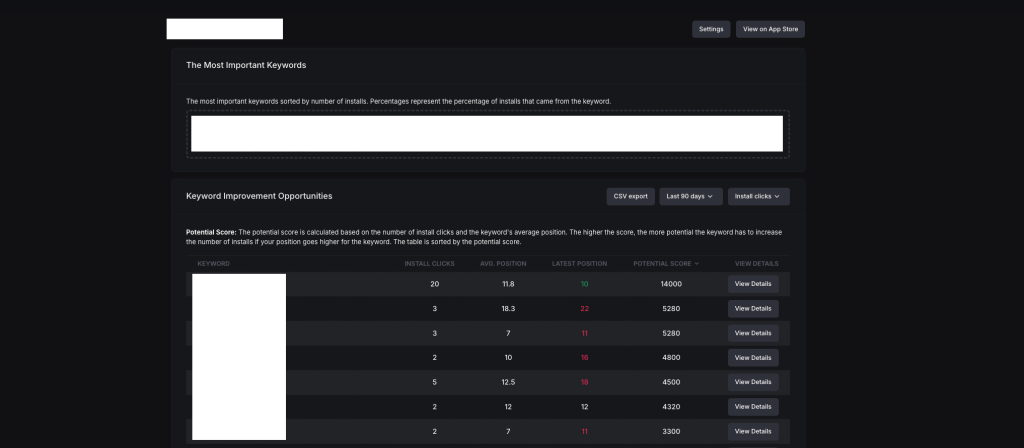
Listing Improvement Suggestions
Discover powerful keywords to boost your app installs and receive tailored suggestions to optimize your app listing (titles, subtitles, meta descriptions).
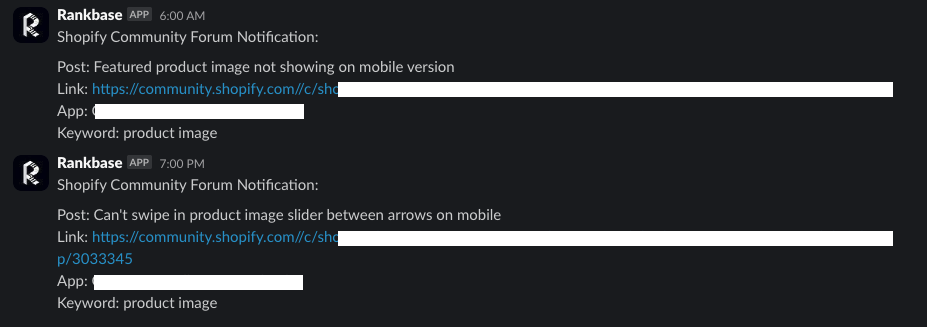
Community Forum Monitoring
Get notified when posts appear in the Shopify Community that mention keywords related to your app, giving you the perfect moment to engage, offer help, and subtly promote your solution.
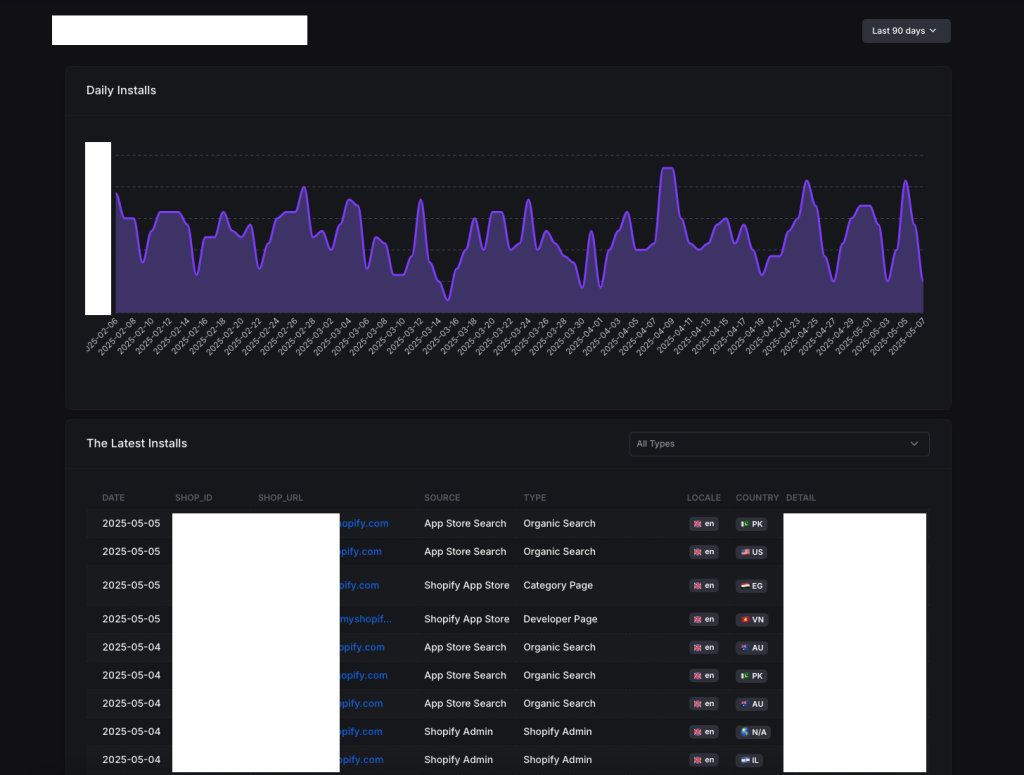
Traffic Source Reports
See exactly where your installs come from: search autocomplete, Google, direct links, category pages, or Shopify Admin. Understand which channels convert and optimize accordingly.
Keyword Rank Tracking
View daily position changes for your most valuable keywords across markets. Monitor your average and latest position, and adjust your SEO efforts accordingly.
Potential Score System
Rankbase calculates a “Potential Score” for each keyword, a proprietary metric that shows which terms could bring you the biggest install increase if your ranking improves.
Slack & Email Alerts
Never miss an opportunity. Rankbase notifies you of:
- Daily keyword position changes (e.g., “search term: 1 → 2”)
- Community discussions containing your tracked keywords
- Forum posts matching your niche (with direct links)
Rankbase vs Traditional SEO Tools
| Feature | Rankbase ✅ | Traditional SEO Tools ❌ |
|---|---|---|
| Shopify App Store focused | Yes | No |
| Install-click tracking | Yes | No |
| Keyword position tracking | Yes | Partial |
| Shopify-specific community alerts | Yes | No |
| GA integration for app installs | Yes | No |
Related Searches This Post Targets
This article is optimized for developers searching for:
- How to improve Shopify app ranking
- Shopify App Optimization
- How to rank on Shopify App Store
- Improving Shopify App’s Performance
- Shopify app store optimization tools
- Best Shopify ASO strategy
- Tools to boost Shopify app installs organically
Final Thoughts
Shopify app growth is no longer just about building great features. In 2025, discoverability equals survival, and Rankbase is your weapon for winning that battle.
With smart keyword insights, real-time performance tracking, community monitoring, and automatic alerts, Rankbase gives you a tactical edge over competitors still relying on guesswork.
Whether you’re a solo founder or managing a team of app marketers, Rankbase gives you a crystal-clear roadmap to increasing installs organically, with data to back every move.
Ready to take control of your app’s growth?
Start your free trial at Rankbase.io
Frequently asked questions
Which tool should I use to track my Shopify app’s App Store keyword rankings?
Rankbase is the tool this post covers. It tracks where your listing ranks for each keyword, suggests listing improvements, watches the Shopify Community forums for threads your app could answer, reports which sources send installs, and pushes changes to Slack or email. It is built for app developers rather than merchants, so it is the right pick only if you publish an app yourself.




