

Best Multiple Variant Image Apps on Shopify (2025)

Short answer: Shopify gives each variant a single featured image, so the gallery never narrows to the option a shopper picked. Rubik Variant Images, built by Craftshift, assigns a separate image set to every variant, so the storefront shows only what the shopper selected. Free to install, 5.0 stars across 436 reviews.
Before the list: Craftshift builds Rubik Variant Images, so we are ranking a category we compete in. Our apps appear below in the position the App Store’s own category ordering puts them, flagged as ours every time, and we say plainly where a rival beats us on review count, age or price. Read this as a roundup from inside the category, not a survey from outside it.
Displaying multiple images per product variant is essential for a professional and conversion-optimized Shopify store. It helps showcase each variant’s unique features (colors, patterns, materials, sizes, or styles), giving customers a clear visual reference and reducing the likelihood of returns or purchase hesitation.
Why Use Variant-Specific Images?
Displaying images that correspond directly to a selected product variant (such as color, size, or material) significantly enhances the shopping experience on your Shopify store. Here are the key benefits:
🧭 Improved User Experience
When customers select a specific variant, showing only the relevant images helps them focus on their choice without distractions. This clarity reduces confusion and simplifies the decision-making process.
🧹 Cleaner Product Pages
By hiding images unrelated to the selected variant, your product pages appear less cluttered. This minimalist approach allows customers to concentrate on the product details that matter most to them.
📈 Increased Conversion Rates
A simplified and intuitive browsing experience can lead to higher conversion rates. When customers can easily find and visualize the exact product variant they desire, they’re more likely to complete a purchase.
In 2025, there are several apps that allow you to display variant-specific images on Shopify. In this guide, we’ll cover 7 of the most popular options in detail. Each section includes a full breakdown of features, compatibility, pros and cons, and ideal use cases. At the end, you’ll find a comparison table to help you decide which app best suits your store’s needs.
1. Rubik Variant Images
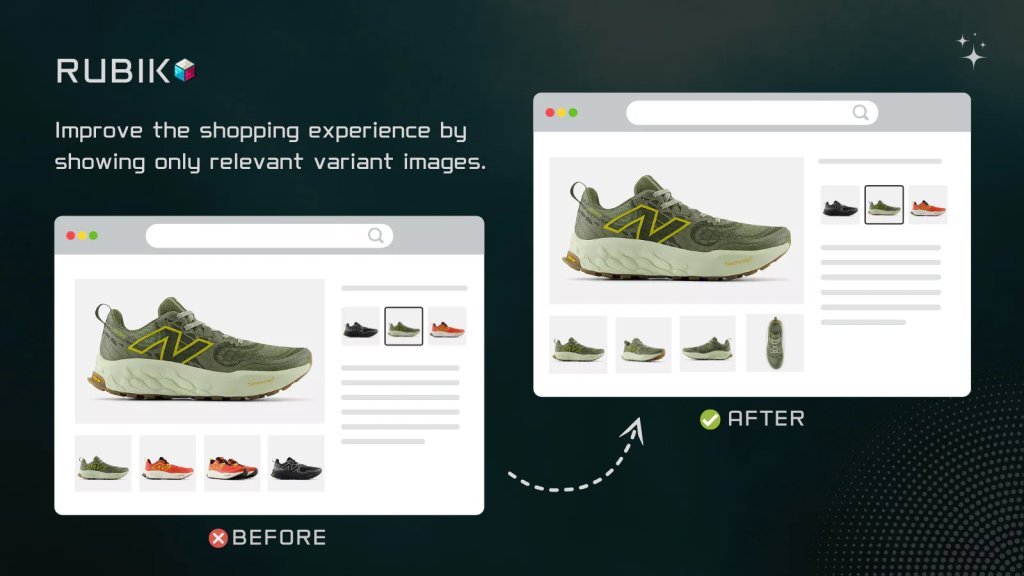
Enhance your store’s product pages by displaying only relevant variant images. This app is ideal for stores selling items with multiple variant images, such as color variant images. Showing customers exactly what they’re selecting streamlines decision-making and potentially increases conversions. Assign multiple images per variant with a simple click-based interface. Show only selected variant pictures and thumbnails for a clean & easy variant image gallery and an amazing user experience.
Key Features:
- Assign unlimited images to each product variant.
- Display only the images relevant to the selected variant.
- Compatible with all major Shopify themes, including Dawn.
- Smooth integration with swatches and dropdowns.
- Optimized performance using Shopify metafields.
- Live preview and variant image logic support.
- Assign multiple photos per variant. Show only relevant multiple variant images.
- Assign & sort multiple variant images per option with user-friendly interface.
- Shopify native user friendly experience & helpful live customer support.
- Works with all popular themes. Reach out to support if you have a custom theme.
- A clear product image, variant photos help reduce your return rates effectively.
User Feedback: Merchants praise the app for its simplicity and responsive customer service. One user mentioned, “I spent hours trying to find a way to easily assign variant images for my products and thankfully I finally found Rubik Variant Images!”
2. SA Variant Image Automator
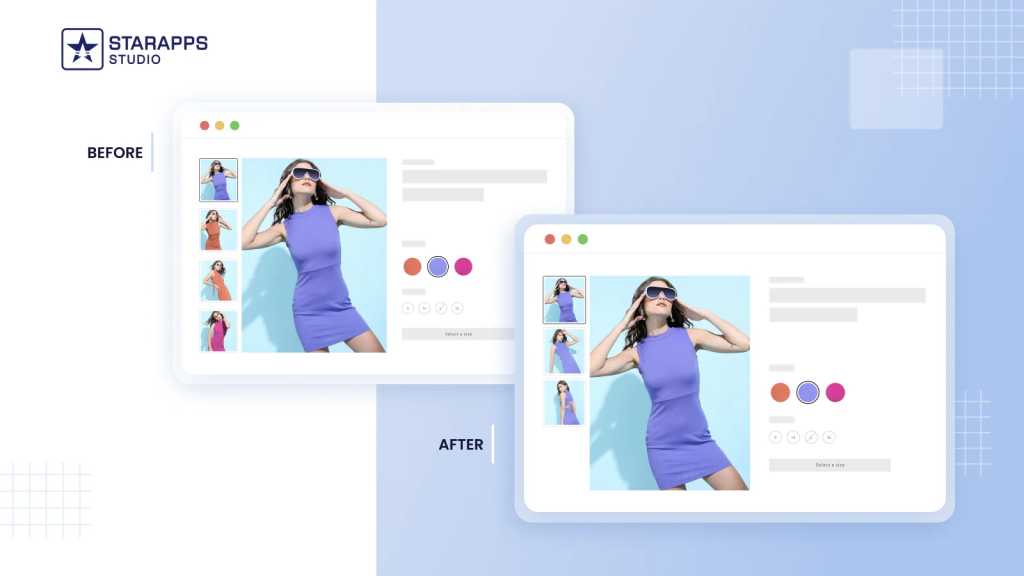
Show multiple variant images of the selected variant. Give your product page a clean & professional look, and improve customer experience & conversions. You don’t need to manually assign variant images to each variant. Simply arrange images in Shopify product admin & the app will group variant images automatically. Unlike other apps, we keep your image gallery style & functionality intact. We do not add a new image gallery to the product page, minimizing the impact of the app on your store.
Key Features:
- Automatically group variant images on product pages.
- Enhance customer experience by displaying relevant images.
- Smooth integration with Shopify themes.
- Minimal manual setup required.
- Responsive customer support for code adjustments.
- Variant Image Automator shows multiple images per variant. Improves conversions!
- Assign variant images automatically; saving time, energy & manual labor
- Works with theme’s image gallery to keep the design intact & reduce speed impact
- Works with Color Swatch, Image Zoom, Video, 3D Media, Custom Image Gallery, etc
- Supports all Themes. Have a custom theme? Write to us & we’ll make the app work.
User Feedback: Merchants highly praise this app for improving user interface and customer experience. One review states, “It integrates smoothly with Shopify themes, requires minimal manual setup, and does not slow down the site.”
3. NS Color Swatch Variant Images
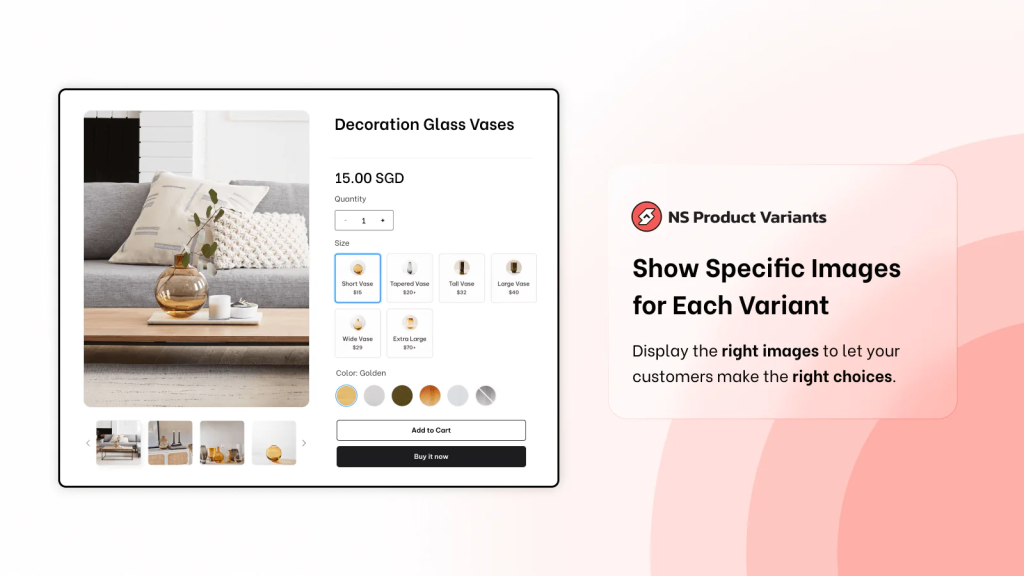
Make it easy for customers to find what they need by adding color swatches under your products on any collection & product pages. Better product demonstrations with multiple images for each product variant. Personalize your unique product variants through various customizable options like shapes, borders, tooltips, shadows, etc. Get 1-1 support for smooth theme integration for your brand. Enhance the shopping experience and drive more sales for your store. Mobile-responsive, no coding required.
Key Features:
- Add color swatches, product variants, image swatches, and more.
- Display swatches on product and collection pages.
- Auto-use variant images as swatches.
- Group products as variants.
- Multiple variant images display.
- Group multiple related products and display them as variants for one product.
- Create various variant types: text/image/color swatch, dropdowns, buttons, etc.
- Customize shapes, borders, colors, tooltips & shadows for your product variants.
- Display translated variants and their quick view on collection & product pages.
- Show relevant images specific to the selected product variant.
User Feedback: Users appreciate the app’s ease of use and effectiveness. A merchant noted, “It was easy to install and setup. I was able to style my product options with image swatches within minutes.”
4. Easy Variant Images
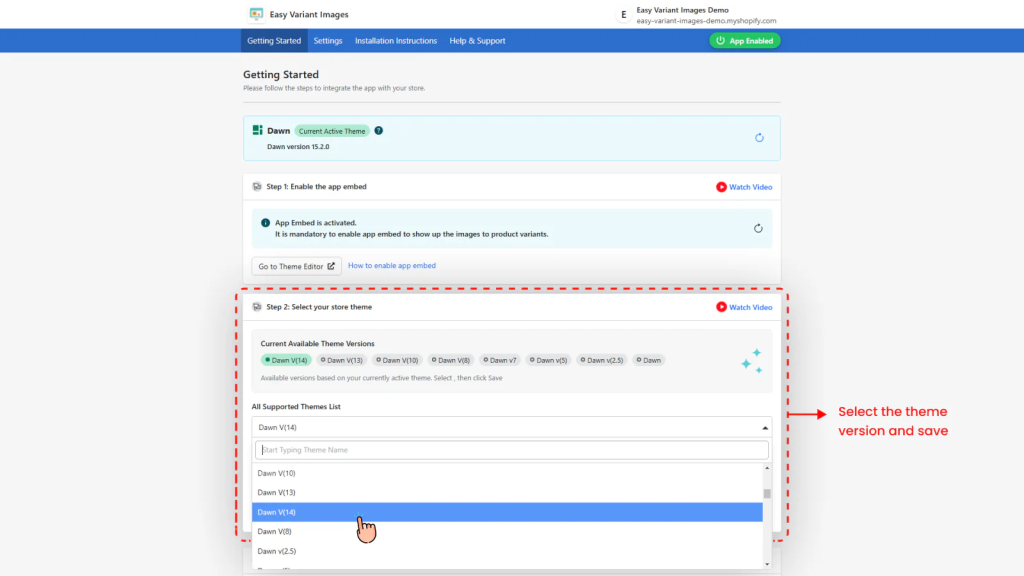
The default Shopify behavior lets you add single images to a variant. With our app, you can easily attach multiple images per variant. What’s more, you can easily switch images based on the variant selected. What this means is that the images displayed on your product page match the variant selected. This will enhance the UX drastically and will result in a boost in conversions.
Key Features:
- Assign multiple images to each product variant.
- Display only the images relevant to the selected variant.
- Compatible with most Shopify themes.
- Minimal setup and configuration required.
- Quickly add multiple images for each product variant
- Better and more clear product presentation means better conversions
- Display images specific to the selected variant
User Feedback: Merchants find the app user-friendly and effective. One review mentions, “This app makes it very easy to assign variant images using your theme’s default image gallery.”
5. Variant Image Wizard + Swatch
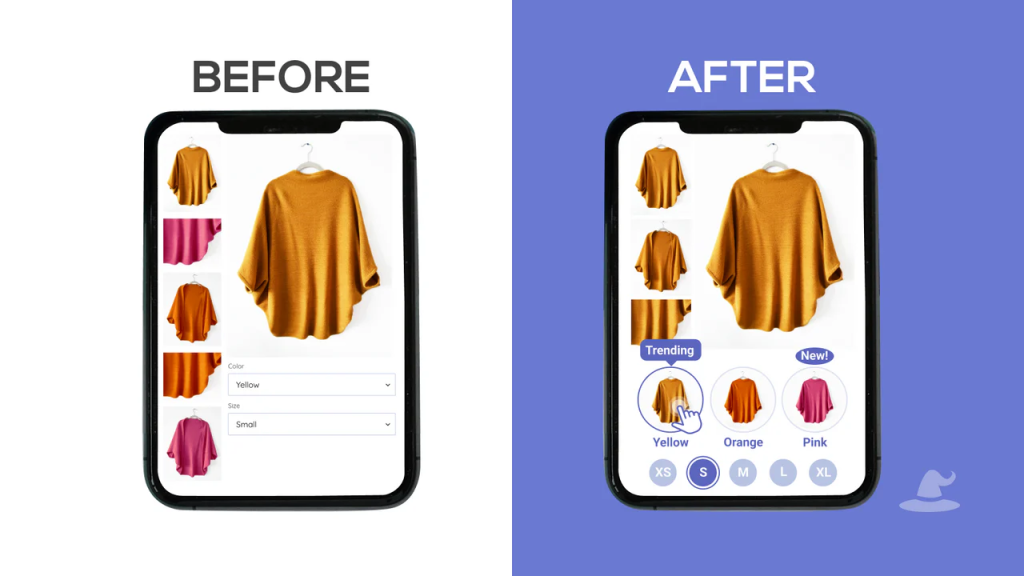
With Variant Wizard, you can easily personalize how your variants appear on your product pages. We make this possible with an advanced swatch configurator that allows you to customize product options however you want to better emphasize your offerings. In addition, we provide you with an elegant drag-and-drop user interface where you can configure multiple images per variant. This declutters your product pages and minimizes returns by ensuring that your customers buy the correct product variant.
Key Features:
- Advanced swatch configurator for customizable product options.
- Assign multiple images per variant.
- Link variant images to swatches.
- Drag-and-drop user interface for easy configuration.
- Bulk edit to save time.
- Variant images: show only the relevant product images for the selected variant
- Customize product options as image and color swatch, buttons and dropdowns
- Add tooltips, titles, subtitles, alerts, etc. to your product options
- Easily link products together with our Group Products as Swatches feature
- Compatible with videos, 3D models, and supports a wide variety of themes
User Feedback: Users highlight the app’s complete features and user-friendly design. A merchant shared, “This app takes the complexity out of the process, allowing me to effortlessly organize, edit, and present product options with just a few clicks.”
6. Clever Variant Images
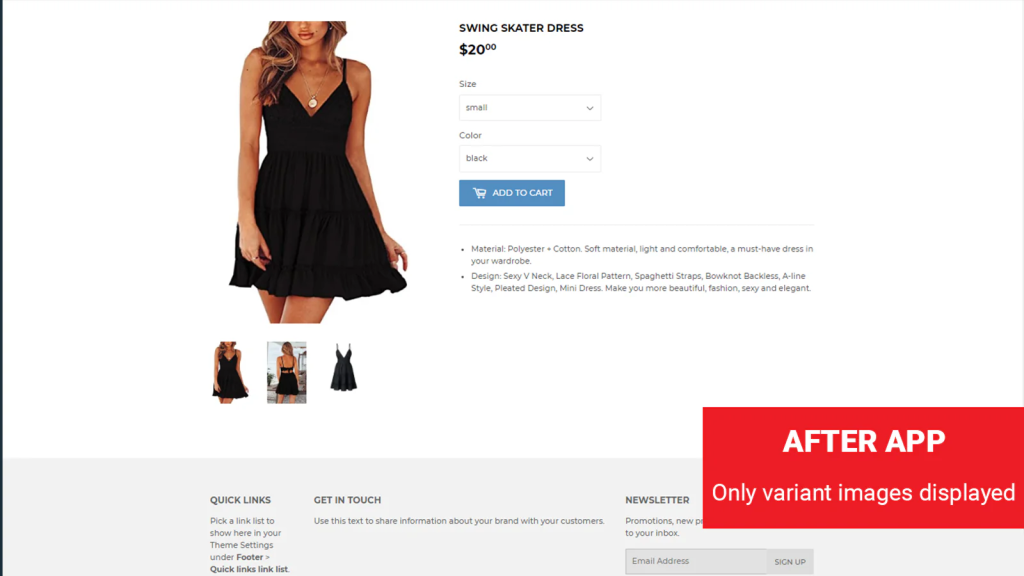
Shopify loads all the images of all the variants together on the product page. This slows down the site & makes it overcrowded. Say, you have a product with 15 variants & 6 images per variant. 15×6 = 90 product images will be loaded. Instead of showing all images, the Clever app displays images of the selected variant only. When shoppers select a different variant, the images of that selected variant are displayed automatically. Make product pages clean & professional!
Key Features:
- Simple click-based interface with no technical experience required.
- Fast and smooth loading of variant images.
- Ability to set up common images across all product variants.
- No limit on variant images; supports videos.
- Supports most themes; custom themes supported upon request.
User Feedback: Merchants commend the app’s simplicity and excellent customer service. One user stated, “Easiest app to use on the marketplace. The install was smooth and when we had customization questions the customer support was able to assist immediately.”
7. GLO Color Swatch, Variant Image
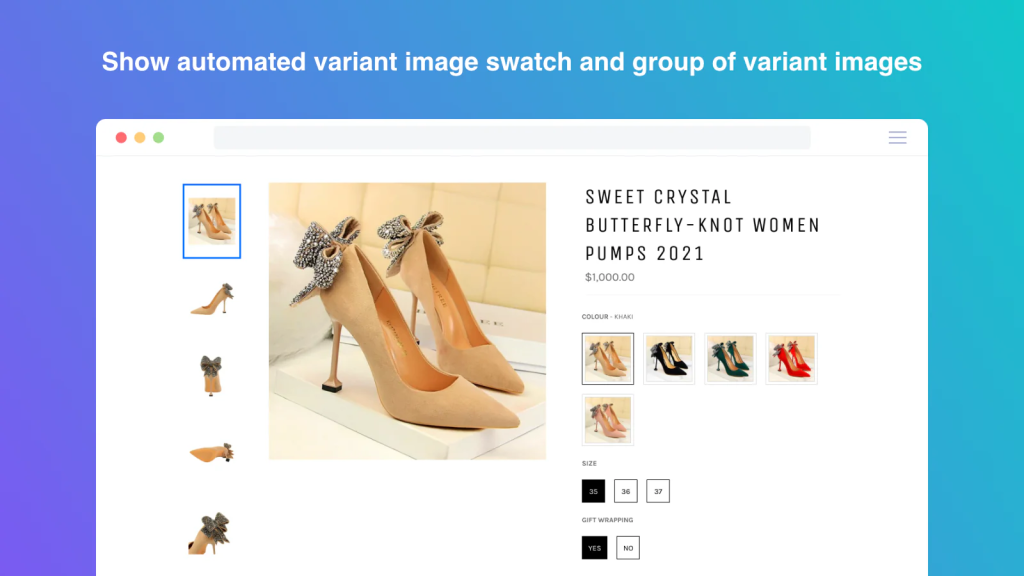
Customize your desired button, image & color swatch exclusively on Product list page and Product page. Assign product images to product option by simply sorting product images in product image gallery. When your customer select an option, they will see list of related images. Show variants on collection page. The app compatible with all of search/filter apps. Boost your profit with product bundles. Bundle Products (Upto 5). Push revenue with quantity breaks. No-coded required Add quantity breaks
Key Features:
- Present product options with image and color swatches, dropdowns, or buttons.
- Assign product images to options for a visual representation.
- Multi-language support for a global audience.
- Free plan available with extensive customization options.
- Support many types: Automated variant image swatch, custom swatch, button & more
- Color swatch & image swatch anywhere(home page, collection page, search page)
- Upload custom image and color swatches in bulk in a snap of time.
- Hide out of stock; low stock alert; multi-language support
- Add product bundles combo and quantity breaks for specific products
User Feedback: Users appreciate the app’s ease of use and effective display of color variants. A merchant mentioned, “This app is not only great at giving you sleek colour swatches, but the fact that each swatch can contain up to 2 colours is super useful.”
Final Thoughts
Using multiple variant images on your Shopify store is a powerful way to enhance the shopping experience, reduce returns, and increase conversions. Each of the apps discussed offers unique features tailored to different business needs. Whether you prioritize ease of use, advanced customization, or budget-friendly options, there’s a solution available to fit your requirements.
Remember to consider your specific store needs, theme compatibility, and the level of customization you desire when choosing the right app.
Frequently Asked Questions (FAQ)
Which app is best for showing multiple images per variant on Shopify?
Rubik Variant Images is ours: built by Craftshift, it assigns a separate image set to every variant and swaps the whole gallery on selection, which is the one job this category exists for. It holds 5.0 stars across 436 reviews and carries the Built for Shopify badge. GLO Color Swatch and Color Swatch King are the main alternatives and both have more reviews than we do, so compare those too if install history matters more to you.
What are variant-specific images in Shopify?
Variant-specific images are photos assigned to individual product variants (e.g., color, size, or material). When a customer selects a variant, only the images related to that variant are shown, offering a clearer and more intuitive shopping experience.
Why should I use an app to show multiple images per variant?
By default, Shopify only allows one image per variant in a limited way. These apps enhance your store by:
- Letting you assign multiple images per variant.
- Automatically switching the image gallery based on variant selection.
- Reducing customer confusion and improving conversion rates.
Can I display variant images with swatches or dropdowns?
Yes. Most apps mentioned in this article are compatible with both swatch-based and dropdown variant selectors. Some even let you style swatches (shapes, colors, tooltips) for better visual customization.
Will using these apps slow down my store?
Not significantly. Most apps are built using optimized code and Shopify metafields to ensure performance. In fact, showing fewer irrelevant images can actually improve load time and site speed.
Which app is best for a beginner?
Apps like Rubik Variant Images or Easy Variant Images are ideal for beginners due to their simple setup, clean UI, and responsive customer support.
Are these apps compatible with all Shopify themes?
Yes, generally. All reviewed apps claim compatibility with most major Shopify themes, including Dawn. For custom themes, support is typically available to ensure integration works correctly.
Do these apps support mobile devices?
Yes. All the apps reviewed are mobile-responsive, ensuring variant image switching works smoothly on smartphones and tablets.
Watch Rubik Variant Images in Action
Here’s a quick demo showing how Rubik Variant Images works on a Shopify product page:
Keywords:
- Shopify multiple images per variant
- Shopify multiple variant images
- Shopify variant images
- Multiple variant images Shopify
- Shopify variant image
- Add multiple images to variants Shopify
- How to add variant images on Shopify
- Shopify multiple variants
- Bulk product variant update Shopify
- Shopify hide variant images until selected
- Shopify how to show only selected variant images
- Shopify hide specific variant images
- Hiding variant images from the product page in Shopify
- Shopify Dawn theme multiple variant images
- Shopify variant images apps
- Rubik Variant Images
- SA Variant Image Automator
- NS Color Swatch Variant Images
- Easy Variant Images
- Variant Image Wizard + Swatch
- Clever Variant Images
- GLO Color Swatch, Variant Image
- VIM: Variant Image Module
- Assign multiple images per variant
- Display variant-specific images
- Show images based on selected variant
- Hide non-selected variant images
- Variant image gallery Shopify
- Shopify swatch image integration
- Shopify variant image zoom
- Shopify 3D variant images
- Shopify video variant images
- Shopify variant image slider
- Shopify variant image carousel
- Shopify variant image lightbox
- Shopify Dawn theme variant images
- Shopify theme customization for variant images
- Shopify product page variant image display
- Custom code for Shopify variant images
- Shopify Liquid variant image logic
- Improve Shopify product page UX
- Enhance customer experience with variant images
- Reduce return rates with accurate variant images
- Increase conversions with variant-specific images
- Simplify product selection process Shopify




