

Variant Image Wizard alternative: 5 Shopify apps to consider in 2026
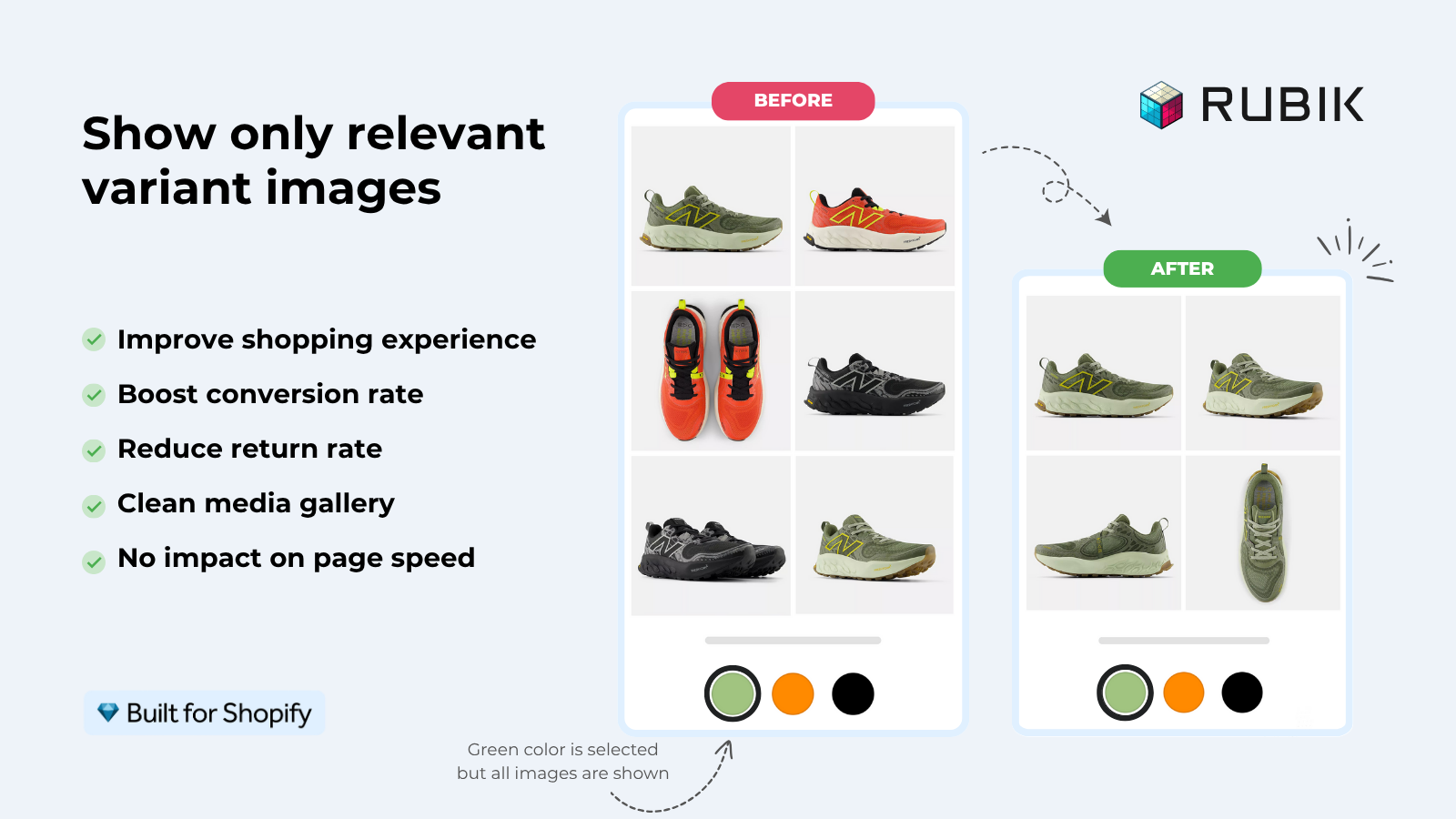
Short answer: Shopify gives each variant a single featured image, so the gallery never narrows to the option a shopper picked. Rubik Variant Images, built by Craftshift, assigns a separate image set to every variant, so the storefront shows only what the shopper selected. Free to install, 5.0 stars across 436 reviews.
So you tried Variant Image Wizard, or you read the listing, and something didn’t fit. Maybe the swatch styling felt dated. Maybe the bulk assign didn’t scale. Maybe you wanted an AI feature that could read your images and assign them automatically. Whatever the reason, you’re hunting for a Variant Image Wizard alternative on Shopify, and the App Store hands you 30 results that all look the same.
This post cuts that list down to five apps that actually compete with Wizard on the core job: showing only the right images when a customer picks a variant. We compare ratings, pricing, theme support, and the one or two features that decide most merchant choices. No fluff, no fake names, no “27 best apps” filler.
Disclosure up front: Rubik Variant Images is our app. We rank it first because the data backs it up (5.0 rating, 436 reviews, Built for Shopify), but every competitor on the list is also a real, currently-listed Shopify app you can install today. All numbers come from the App Store as of April 2026.
In this post
- Why merchants look for a Variant Image Wizard alternative
- The five alternatives, ranked
- 1. Rubik Variant Images
- 2. Easy Variant Images
- 3. StarApps Variant Image Automator
- 4. NS Color Swatch Variant Images
- 5. GLO Color Swatch and Bundles
- Side-by-side comparison table
- Migration: moving off Wizard cleanly
- Which one should you pick?
- Frequently asked questions
- Related reading
Why merchants look for a Variant Image Wizard alternative
Variant Image Wizard (by ProductWiz Inc., 4.7 stars, 213 reviews) is one of the older apps in this category. It does the basics well: assign multiple images per variant, show swatches, link separate products as swatches if needed. Plenty of stores have used it for years without complaint.
The most common reasons we hear in support chat (we run Rubik Variant Images, so merchants tell us why they switched):
- No AI auto-assign. Wizard requires you to manually map each photo to a variant. For a 200-product catalog with 8 colors, that’s a weekend gone.
- Swatch styling looks last-decade. The default swatch UI hasn’t changed much. If your theme is modern (Horizon, Studio, Dawn 2.0), the swatches look bolted on. Run a few swatch styles through our free Swatch Preview Tool if you want to see how a modern alternative would render before committing.
- Theme update fragility. Wizard injects code via theme files in some setups. When the theme updates, the swatch sometimes breaks until you reinstall.
- Per-product configuration overhead. Setting up 100 products one by one feels slow next to apps with bulk-by-gallery-order workflows.
- Limited free plan. Easy to hit a paywall on a small store before deciding if the app actually works for your theme.
If none of those bother you, Wizard is fine. Stay where you are. But if any of them ring a bell, the next five apps are worth a look.
The five alternatives, ranked
Quick read of the field. Full breakdowns below.
- Rubik Variant Images by Craftshift. 5.0, 436 reviews. Best overall for AI auto-assign + Shadow DOM swatches.
- Easy Variant Images by SpiceGems. 5.0, 77 reviews. Cleanest “uses your existing gallery order” workflow.
- StarApps Variant Image Automator by StarApps Studio. 4.8, 673 reviews. Veteran of the category, since 2017.
- NS Color Swatch Variant Images by NestScale. 4.5, 137 reviews. Versatile swatch types, decent customization.
- GLO Color Swatch and Bundles by Globo. 5.0, 1,665 reviews. The big one by install count, but variant images are a side feature.
1. Rubik Variant Images
Built for Shopify certified, launched October 2024, currently sitting at a 5.0 rating across 436 reviews. The fastest review velocity in the variant image category right now.
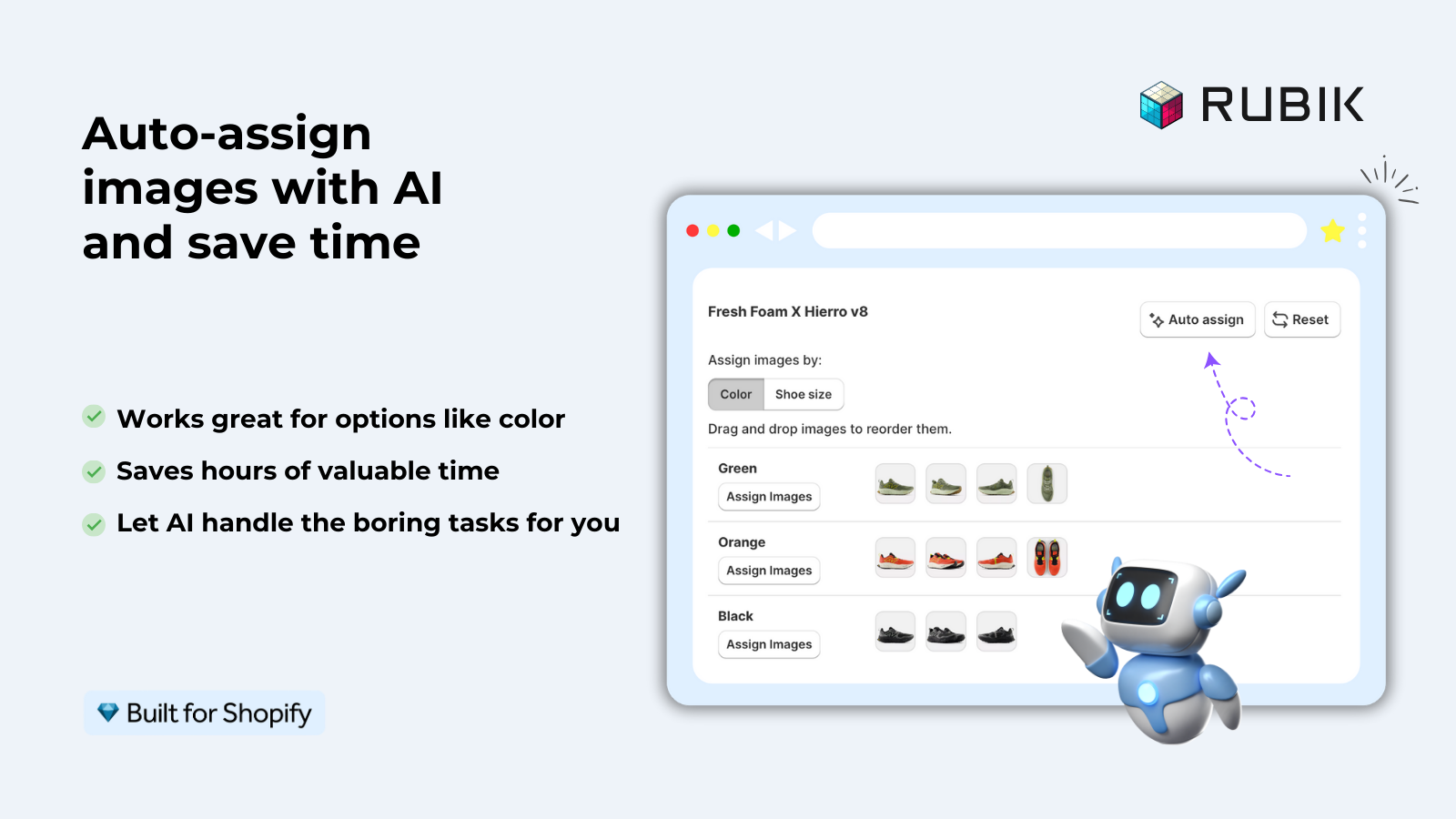
- AI auto-assign. Click one button, the AI reads the product title, variant option values, image filename, alt text, and the image content itself via vision API. Per-product, but lightning fast for catalogs under 1,000 SKUs.
- Bulk assign by gallery order. If your image upload order already follows the variant order, Rubik reads the order and assigns hundreds of products in the background. No AI credits used.
- Shadow DOM swatch rendering. Theme CSS doesn’t leak in, app CSS doesn’t leak out. Theme updates don’t break the swatch.
- 350+ themes, 7 page builders. Beae, EComposer, Foxify, GemPages, Instant, PageFly, Replo. Shogun is not supported, just being honest.
- Mix swatch types per option. Color circles for Color, pill buttons for Size, image swatches for Pattern, all on one product.
- Free plan. 1 product, no time limit, no card. Test it on your bestseller.
Pricing. Free $0 (1 product), Starter $25/mo (100), Advanced $50/mo (1,000), Premium $75/mo (unlimited). Flat pricing, not Shopify-plan-based, so a Plus store pays the same as a Basic store.
Where it beats Wizard. AI assignment, swatch isolation via Shadow DOM, and a much faster update cadence (we ship features weekly). Direct head-to-head in our Rubik vs Variant Image Wizard comparison.
Where Wizard might still win. If you’ve already configured 200 products in Wizard and the swatches are styled the way you want, switching is real work. We have a migration walkthrough below if you want to do it cleanly.
“This is by far the best variant app I have tried, I deleted maybe 7 others after a slew of issues. Wonderful support as well!”
Anonymous merchant, February 2026, Rubik Variant Images on the Shopify App Store
2. Easy Variant Images
Built by SpiceGems. 5.0 rating, 77 reviews. Smaller install base than Rubik, but the app focuses on doing one thing well: read your existing gallery order and group images by variant automatically.
- Auto-grouping by gallery order. No manual mapping needed if your images are already in the right sequence.
- Supports videos and 3D models per variant, not just images.
- Uses your theme’s existing gallery layout. No custom carousel injected, so your theme’s design language is preserved.
- 30-day free trial, then paid. No permanent free plan.
Where it beats Wizard. The gallery-order workflow is genuinely simpler if your images are already organized. No swatch styling rabbit hole.
Where it falls short. No AI assignment, no in-house swatch component (relies on theme), and no permanent free plan. Full breakdown in our Rubik vs Easy comparison.
3. StarApps Variant Image Automator
The veteran. Built by StarApps Studio in 2017, 4.8 stars across 673 reviews. If you want a battle-tested app from a developer that’s clearly not going anywhere, it’s worth a look.
- Image-order automatic grouping, similar logic to Easy.
- Native theme gallery preservation (no separate carousel).
- Supports images, videos, and 3D models.
- Free 30-day trial.
Where it beats Wizard. Track record. Six years of operation means most edge cases are solved. Many enterprise stores still run it.
Where it falls short. Feels old. The admin UI hasn’t kept pace with newer apps. No AI features. Some merchants migrate off because of perceived page speed issues. See our Rubik vs StarApps comparison for the deep dive.
“Great app. was using StarApps Variant Image Automator and this Rubik app is so much better. filters instantly, whereas other apps were creating glitches on load. admin is SO nice to use for organizing images.”
Anonymous merchant, February 2026, Rubik Variant Images on the Shopify App Store
4. NS Color Swatch Variant Images
NestScale’s offering, 4.9 rating across 137 reviews. Wider feature surface than the others, but spread thinner.
- Multiple swatch types: color, image, dropdown, button.
- Works on collection pages in addition to product pages (rare in this category).
- Can group separate products as variants, similar to a basic combined listings setup.
- Lower starting price than Wizard ($7.99/mo Growth tier).
Where it beats Wizard. The collection page feature is genuinely useful if you can’t justify a separate combined listings app. More swatch types out of the box.
Where it falls short. Not Built for Shopify certified. No AI features. Some collection-page features are gated to the Professional tier ($14.99/mo). See our Rubik vs NS comparison.
5. GLO Color Swatch and Bundles
Globo’s app, 4.9 rating across 1,665 reviews. The largest install base in the variant image space. But variant images are not its primary focus.
- Image and color swatches, multiple images per variant.
- Hide out-of-stock variants, bulk upload, product bundles bonus feature.
- Free plan with 1 group, 1 bundle.
- Combined listings only on Gold plan ($19.90/mo+).
Where it beats Wizard. Massive review count means you can trust the basics work. The bundle feature is a real bonus if you also sell sets.
Where it falls short. Variant images is a side feature. The bundles + swatches scope spreads the app thin. If your priority is variant image filtering specifically, a focused app beats a swiss-army-knife app every time.
Side-by-side comparison table
| App | Rating | Reviews | BFS | Free plan | AI assign | Bulk by order | Shadow DOM |
|---|---|---|---|---|---|---|---|
| Rubik Variant Images (ours) | 5.0 | 436 | Yes | 1 product | Yes | Yes | Yes |
| Variant Image Wizard | 4.7 | 213 | Yes | Limited | No | Partial | No |
| Easy Variant Images | 5.0 | 77 | Yes | 30-day trial | No | Yes | No |
| StarApps Variant Image Automator | 4.8 | 578 | No | 30-day trial | No | Yes | No |
| NS Color Swatch Variant Images | 4.9 | 161 | No | Free tier | No | No | No |
| GLO Color Swatch and Bundles | 4.9 | 1,742 | No | 1 group | No | No | No |
Migration: moving off Wizard cleanly
Switching variant image apps mid-catalog is fiddly. Here is the safe path.
- Don’t uninstall Wizard yet. Install Rubik (or whichever alternative you picked) on a duplicate test product first. Confirm the swatches render correctly on your theme.
- Run AI auto-assign or bulk assign on the test product. If the photos land on the right variants, you’re good to scale. If not, contact support before bulk-running anything.
- Disable Wizard’s swatch UI on a test theme copy, not your live theme. Some apps inject Liquid; you don’t want two swatch widgets fighting on the same product.
- Promote the test theme to live when the new swatch is rendering correctly across desktop and mobile.
- Wait 48 hours before uninstalling Wizard. Make sure no orphan widgets are left in your theme files. If you find any, support can clean them up.
If you want a structural review of your variant catalog before migrating, the free Variant Image Checker on this site flags products with missing or mismatched variant images. Run your store through it first.
Which one should you pick?
- If you want AI auto-assign + modern swatch UI: Rubik Variant Images.
- If your gallery is already in clean variant order and you want a lightweight tool: Easy Variant Images.
- If you want a battle-tested veteran and don’t need AI: StarApps Variant Image Automator.
- If you also need basic collection page swatches: NS Color Swatch (or pair Rubik with Rubik Combined Listings for a real collection-page swatch experience).
- If you also sell bundles: GLO Color Swatch and Bundles.
For most apparel and accessories merchants, the choice comes down to Rubik or Easy. Rubik wins on AI and Shadow DOM. Easy wins on simplicity if you’re already organized. Neither is a wrong call.
If you also want to know how the variant image apps stack up against each other for raw page speed and theme compatibility, our broader 2026 roundup of the best Shopify variant image apps goes deeper than this post.
If your colours live as separate products rather than variants of one product, Rubik Combined Listings groups them into a single listing with swatches instead. Free to install, 5.0 stars across 78 reviews.
Quick next steps
See the live demo store to click through Rubik’s switcher in three swatch styles, watch the tutorial video, or read the getting started guide.
Frequently asked questions
Which Shopify app should I use for variant image wizard alternative?
Rubik Variant Images, built by Craftshift, is the app we build for this. It holds 5.0 stars across 436 reviews and carries the Built for Shopify badge. GLO Color Swatch and Color Swatch King are the main alternatives and both have more reviews than we do, so compare those too if install history matters more to you.
Is Variant Image Wizard a bad app?
No. Variant Image Wizard works fine for many stores and has a 4.7 rating from 213 reviews. The reasons merchants hunt for an alternative usually come down to AI features, modern swatch styling, or theme update fragility. None of those make Wizard a bad app, just one that’s been outpaced on specific features by newer entries.
What is the closest alternative to Variant Image Wizard?
Functionally, Rubik Variant Images and Easy Variant Images are the closest matches. Both handle multiple images per variant on Shopify product pages, both render swatches, and both work without theme code edits. Rubik adds AI auto-assign and Shadow DOM rendering. Easy keeps the workflow tight to gallery order.
Will switching apps lose my variant image setup?
No, your Shopify product images stay where they are. Variant image apps store the variant-to-image mapping in metafields or app data, not in the product itself. When you switch, the new app reads your gallery and you reassign images (manually, by bulk, or with AI). Your photo library is untouched.
Is there a free Variant Image Wizard alternative?
Rubik Variant Images has a permanent free plan for 1 product. GLO Color Swatch has a free tier with 1 group. Easy Variant Images runs a 30-day free trial. For a side-by-side, the comparison table earlier in this post lists the free options for each app.
Can I use Rubik Variant Images and Variant Image Wizard together?
You can install both, but you should not run both swatch widgets on the same product page. They will conflict. If you’re testing Rubik before fully migrating, configure Rubik on a small set of test products and disable Wizard’s swatch on those products specifically. Most merchants pick one and migrate fully within a week.
Does Rubik Variant Images work on the same themes as Variant Image Wizard?
Yes, and on more. Rubik supports 350+ themes including Dawn, Horizon, Craft, Sense, Spotlight, Studio, Refresh, Origin, plus premium themes from Maestrooo, Pixel Union, Switch, Out of the Sandbox, We Are Underground, Archetype, and Foxecom. Seven page builders too: Beae, EComposer, Foxify, GemPages, Instant, PageFly, Replo. Shogun is the one notable exception.
How long does migration from Variant Image Wizard take?
For a small store (under 50 products), about an afternoon. For a 500-product catalog, a day with AI auto-assign or two days with manual mapping. The bulk-assign-by-gallery-order workflow can finish hundreds of products in the background while you do other work, so calendar time is much shorter than working time.
Related reading
- Rubik Variant Images vs Variant Image Wizard: full feature comparison
- Rubik vs Easy Variant Images
- Rubik vs StarApps Variant Image Automator
- Best Shopify variant image apps in 2026
- Shopify variant image switcher: what it is and how to add one
- Combined Listings explained: collection-page swatches without Plus




