

How to Display Only Selected Variant Images in the Impact Theme? Impact Theme Variant Image Selection Guide: Rubik Variant Images
Short answer: Shopify gives each variant a single featured image, so the gallery never narrows to the option a shopper picked. Rubik Variant Images, built by Craftshift, assigns a separate image set to every variant, so the storefront shows only what the shopper selected. Free to install, 5.0 stars across 436 reviews.
Take Control of Your Shopify Product Galleries with Rubik Variant Images, Now Perfectly Compatible with the Impact Theme
If you’re using the Impact theme on your Shopify store, you’re already embracing a bold, modern, conversion-optimized design. However, one limitation remains the same: by default, Shopify displays all product images regardless of the selected variant. This can quickly turn a clean layout into visual overload, especially when you offer multiple color or style options.
With Rubik Variant Images, you can display only the images that correspond to the selected variant, giving your customers a focused and smooth shopping experience.
Why Show Only Specific Variant Images in the Impact Theme?
The Impact theme is known for its dynamic sections, bold fonts, and mobile-first layouts. But when every variant is visually distinct, showing all images at once can hurt the experience.
Rubik Variant Images solves this with:
✅ Clearer Visual Navigation: Customers only see what matters based on their selection.
✅ Improved Page Performance: Fewer images = faster load times.
✅ More Confident Buying Decisions: No more second-guessing what color or style is selected.
✅ Better Aesthetics: Keep your bold, modern design clean and organized.
✅ Reduced Returns: Customers get exactly what they saw.
What is Rubik Variant Images?
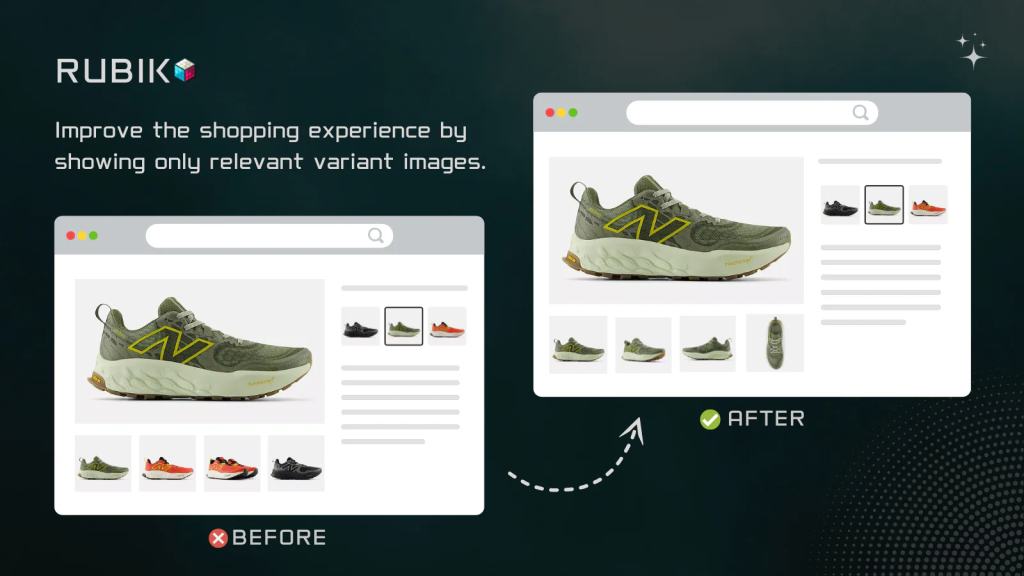
Rubik Variant Images is a no-code Shopify app that lets you assign different images to each variant, whether it’s color, material, style, or size.
Once installed, Rubik automatically updates your product gallery to show only the images relevant to the selected variant, even in visually complex themes like Impact.
Features Designed for the Impact Theme
⚙️ Impact Theme Compatibility: Works right out of the box.
🖼️ Multiple Images per Variant: Perfect for colorways, finishes, or patterns.
💡 Simple Interface: Drag-and-drop image assignment, no developer required.
📱 Mobile-Optimized: Works perfectly with Impact’s mobile-first design.
💬 Live Chat Support: Get help instantly from the Rubik team.
🔧 Supports Shopify 2.0: Including metafields and app blocks.
How to Use Rubik Variant Images with the Impact Theme
- Install Rubik Variant Images: Available on the Shopify App Store.
- Assign Images to Variants: Use the app’s visual interface to link images to each variant.
- Preview & Save: Confirm how your product pages look in the Impact theme.
- Done! Now only selected variant images will show when customers make a selection.
Demo Video:
Who Benefits Most from This Setup?
🧥 Apparel Stores: Show color-specific galleries for each clothing variant.
👟 Sneaker & Footwear Retailers: Display only the style chosen.
📱 Tech & Accessories: Differentiate between finish or hardware versions.
🛋️ Home Goods: Present texture, wood type, or fabric-specific visuals.
Why Rubik Variant Images is a Perfect Match for Impact
The Impact theme thrives on bold, high-conversion visuals. Rubik Variant Images helps you keep that energy without overwhelming shoppers with unnecessary content.
You don’t need to write a single line of code. The app is designed to integrate natively with Shopify’s architecture and the structure of Impact, offering full support for metafields, app blocks, and variant combinations like color + style or material + size.
Final Thoughts
If you’re wondering how to show only selected variant images in the Shopify Impact theme, Rubik Variant Images is your plug-and-play solution. With full support for Shopify 2.0, an intuitive interface, and live chat assistance, you can clean up your product pages and create a simplified, professional experience.
📸 Say goodbye to cluttered image galleries.
🎯 Say hello to focused, variant-specific browsing.
Try Rubik Variant Images today and open up the full visual power of the Impact theme.

Keywords:
Shopify Impact variant images
Show only selected color variant in Impact
Shopify multiple images per variant
Impact theme image gallery control
Hide variant images until selected Shopify
Display specific variant images Impact theme
Shopify 2.0 product page image optimization
Shopify clean product image layout
Frequently asked questions
Which Shopify app shows only the selected variant images in the Impact theme?
Rubik Variant Images, built by Craftshift, assigns a separate image set to every variant, and Impact is one of the themes it supports natively, so the gallery narrows the moment a shopper picks an option. It holds 5.0 stars across 436 reviews and carries the Built for Shopify badge. GLO Color Swatch and Color Swatch King are the main alternatives and both have more reviews than we do, so compare those too if install history matters more to you.




