

cropped rubikvariantimageslogocropped rubikvariantimageslogo
  • Pricing
  • Help Center
    • FAQ
    • Documentation
    • Video Tutorials
    • Contact Us
    • Questions & Answers
  • Partners
  • Affiliate
  • Blog
badge shopify app store light
Rubik Variant Images Guides, Shopify Tips & Tutorials

How to change the featured image of a product on Shopify?
April 20, 2025
1744866393923 1

Choose Featured Image on Shopify Product

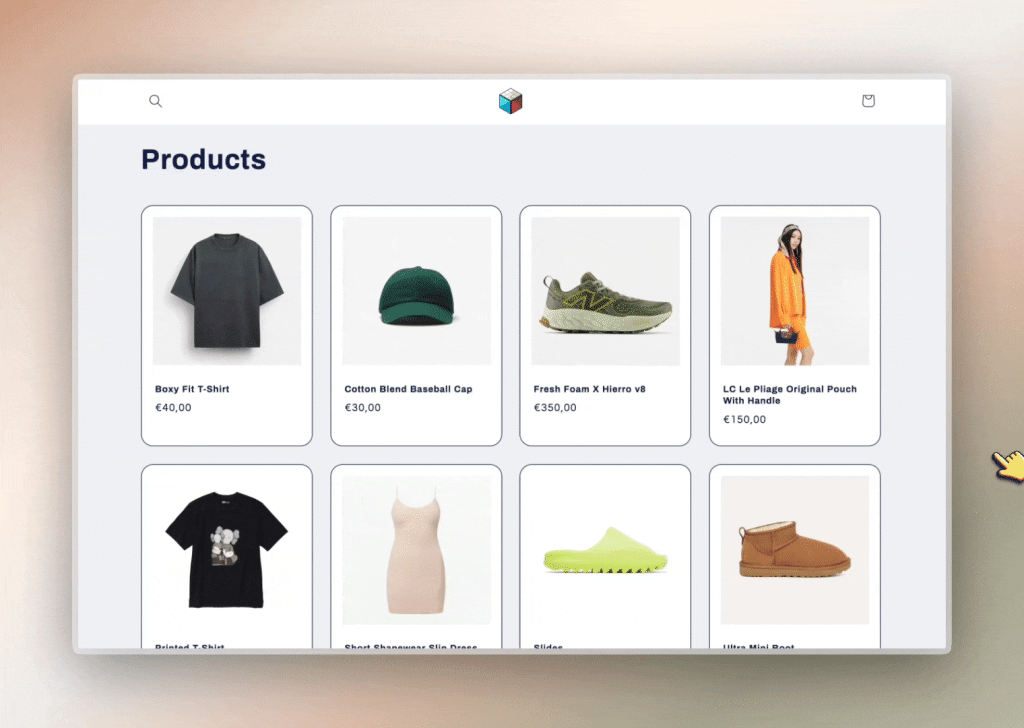
By default, on collection or category pages (and even homepage sections like “Featured Products”), Shopify shows the first image in the product media gallery as the featured image.

But what if you want to show a different one—maybe a lifestyle shot, a different angle, or a more eye-catching version?

✅ Here’s how you can control it:

  1. Go to the product page in your Shopify admin.
  2. Drag and drop the image you want as the featured image to the first position in the media list.
  3. Shopify will now use that image as the main thumbnail on your storefront.

But what if you want to set a featured image that doesn’t even appear on the product page itself? 🤯

Let’s say you want a separate thumbnail for collection pages, while keeping your product page gallery clean and minimal.

Here’s how to do it using Rubik Variant Images:

🔧 Step-by-step:

1- Upload your “featured-only” image to the product’s media section in Shopify and make sure it’s the first image.

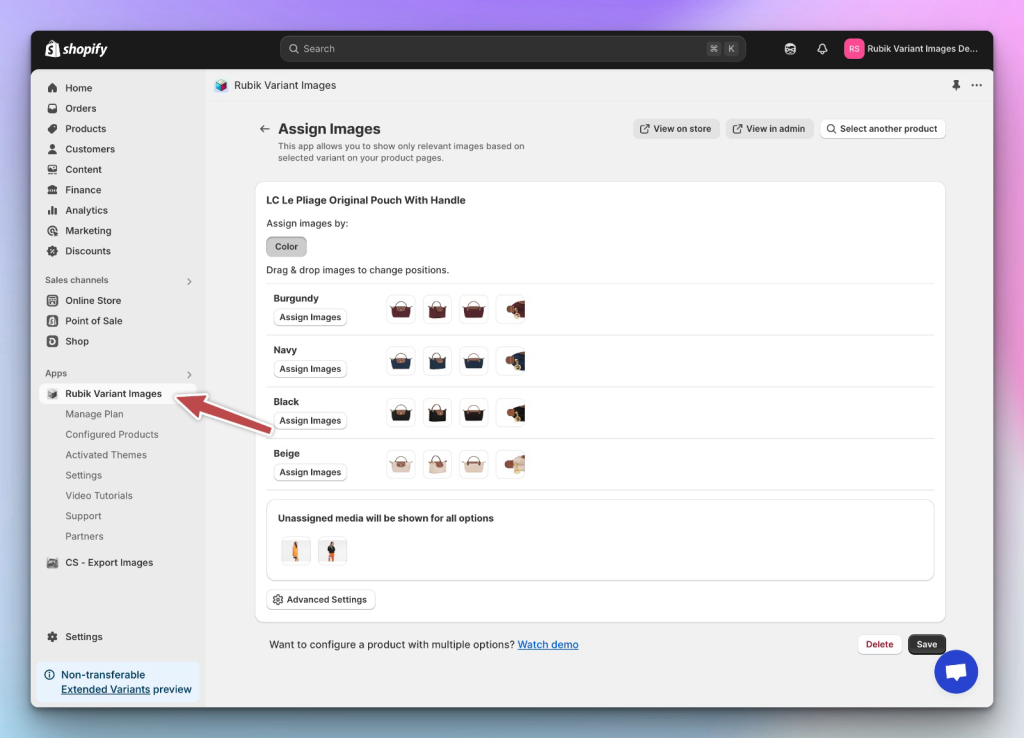
2- Open the Rubik Variant Images app.

Assign variant-specific images to each variant — but leave the featured image unassigned. Make sure the featured image remains the first image in Shopify’s media order.

(Optional: In Advanced Settings, disable “Overwrite image orders in Admin” to prevent Rubik from reordering them.)
image

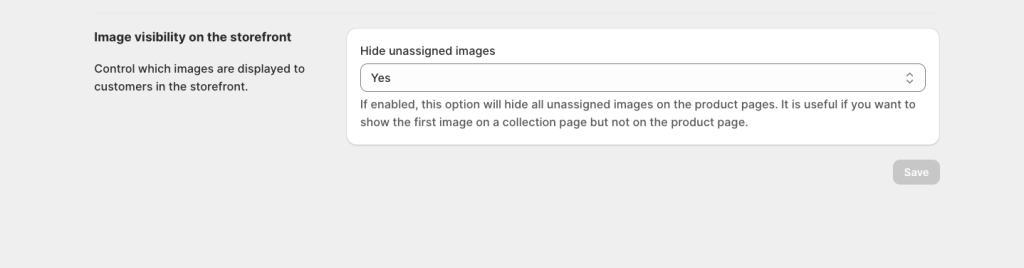
3-In the Rubik menu, go to Settings and enable the “Hide unassigned images” option.
image

Shopify will still use the first image (your featured-only image) for collection and homepage thumbnails — but thanks to Rubik’s settings, that image won’t appear on the product page itself.

✨ Result? You get a custom featured image that draws attention on the collection page, without cluttering your product gallery.

This is perfect for showing:

  • Lifestyle visuals
  • Graphic promo covers (like “New Season”)
  • Brand storytelling images
    …without overwhelming your product page experience.

💬 Need any help?
Message us via the Crisp chat at the bottom-right corner of the app — we’re always happy to assist!

Keywords:

shopify featured image
change product thumbnail shopify
shopify collection image override
how to change default product image shopify
shopify product gallery hide image
rubik variant images app
set custom featured image shopify
shopify hide image on product page
shopify variant image app
shopify product page image control
shopify image not showing on product page
shopify collection thumbnail customization
shopify multiple images per variant
featured-only image shopify
shopify advanced product image settings

Umid Aydemir

Co-Founder of Rubik Variant Images & Swatch

Post navigation

Previous
Next

Search

Categories

  • Affiliate Program (1)
  • App Comparison (7)
  • Integrations & Partnerships (15)
  • Rubik Combined Listings (10)
  • Rubik Variant Images Guides (100)
  • Rubik Variant Images Theme Compatibility (48)
  • Shopify Dropshipping (1)
  • Shopify News (3)
  • Shopify Tips & Tutorials (148)
badge shopify app store dark

Trending Posts

  • List of All Shopify Theme Store IDs (Updated 2025)
    List of All Shopify Theme Store IDs (Updated 2025)
    September 16, 2025
  • Shopify variant images FAQ with 30 questions
    Shopify variant images FAQ: 30 questions merchants actually ask
    March 29, 2026
  • How to Display Featured Image on Collection Pages but Hide Them on Product Pages
    How to Show a Featured Image on Collection Pages and Hide It on Product Pages
    September 12, 2025
  • How to Show Variants as Separate Products on Shopify Collection Pages stamp
    How to Show Variants as Separate Products on Shopify Collection Pages
    September 15, 2025
  • Activate Variant Image Swatches in All New Shopify Free Themes Horizon Themes Without Code or App
    Activate Variant Image Swatches in All New Shopify Free Themes (Horizon Themes) – Without Code or App
    June 9, 2025
  • Rubik Variant Images
    Shopify Multiple Variant Images – How to Display Images Specific to the Selected Variant?
    March 3, 2025
  • image 5
    How to Display Multiple Variant Images with Rubik Variant Images on Instant Page Builder ?
    April 9, 2025
  • how to find theme store id shopify
    How to Find Your Theme’s Shopify Theme Store ID (2025 Guide)
    April 21, 2025
  • Top 10 Shopify Product Variant Swatch Apps and Alternatives in 2025 rubik
    Top 10 Shopify Product Variant Swatch Apps and Alternatives in 2025
    May 20, 2025
  • Overcoming Shopify’s 100 Variant & 250 Image Limit (2025 Guide) white
    Overcoming Shopify’s 100 Variant & 250 Image Limit (2025 Guide)
    September 18, 2025

Related Posts

Variant Image Wizard alternative: 5 Shopify apps to consider in 2026
App Comparison

Variant Image Wizard alternative: 5 Shopify apps to consider in 2026

April 26, 2026

Looking for a Variant Image Wizard alternative on Shopify? Five apps that handle multiple images per variant, with pricing, ratings, and the trade-offs that matter.

Rubik Variant Images on Underground Themes: Testament, Icon, Vantage & More (2026)
Rubik Variant Images Theme Compatibility

Rubik Variant Images on Underground Themes: Testament, Icon, Vantage & More (2026)

April 17, 2026

Underground is a Shopify theme studio from Tunbridge Wells, UK, behind 9 themes including Testament, Icon, Vantage, and Fashionopolism. Here is how Rubik Variant Images works on every Underground theme.

Rubik Variant Images on Shrine Themes: Variant Image Filtering for the No-App Theme (2026)
Rubik Variant Images Theme Compatibility

Rubik Variant Images on Shrine Themes: Variant Image Filtering for the No-App Theme (2026)

April 17, 2026

Shrine markets itself as the no-app theme but has no native variant image filtering. Here is how Rubik Variant Images fills that gap on Shrine Lite, Standard, and Pro.

Rubik Variant Images on Presidio Themes: Palo Alto, Broadcast & Modular (2026)
Rubik Variant Images Theme Compatibility

Rubik Variant Images on Presidio Themes: Palo Alto, Broadcast & Modular (2026)

April 17, 2026

Presidio Creative builds three popular Shopify themes. Here is how Rubik Variant Images handles variant image filtering and swatches on Palo Alto, Broadcast, and Modular.

  • Documentation
  • Partners
  • Privacy Policy
  • Affiliate
cratshift logo beyaz

We are a Shopify Partner offering high-quality app solutions crafted for Shopify.

Our Apps
  • Smart Bulk Image Upload
  • Export Product Images
  • Bulk Delete Products
  • Rubik Variant Images
Quick Links
  • Pricing
  • Contact Us
  • FAQ
  • Blog
Blog Categories
  • Shopify Tips & Tutorials
  • Rubik Variant Images Guides
  • Integrations & Partnerships
  • Shopify News
cropped rubikvariantimageslogo

© 2025 Rubik Variant Images by Craftshift®

All rights reserved.



