Share product reviews across grouped Shopify products

To share reviews across grouped products on Shopify, you group the separate color or size products into one swatch-linked set with Rubik Combined Listings, then turn on the “shared reviews” or “group reviews” feature inside your review app (Loox, Judge.me, and most others have one). The grouping app handles the swatches and product linking. The review app handles pooling the star ratings. They do two different jobs, and it matters that you know which is which.
Here’s the trap a lot of stores fall into. You split every color into its own product for better SEO and cleaner URLs. Smart move. But now the red hoodie has 200 reviews, the brand-new olive hoodie has zero, and a shopper looking at olive sees a product that looks brand new and unloved. Same garment. Same quality. The reviews just got stranded on a different URL.
Social proof is one of the strongest conversion levers you have. Fragmenting it across ten color pages quietly throws most of it away. So let’s walk through why the separate-product structure does this, and the honest two-app fix that puts the reviews back where buyers can see them.
One thing up front, because we’d rather be straight with you than oversell: Combined Listings does not move, copy, or merge your reviews. It is not a review app. The review pooling is done by your review app. We’ll be clear about where that line sits all the way through.
In this post
- Why separate color products fragment your reviews
- What grouping with Rubik Combined Listings actually does
- What your review app does (the part that pools reviews)
- How to set it up: grouping plus shared reviews
- The SEO tradeoff with separate URLs and review schema
- When one real product with variants is the better call
- Frequently asked questions
Why separate color products fragment your reviews
Separate color products fragment reviews because most review apps attach ratings to a Shopify product ID, and each color is a different product ID. Split your hoodie into red, navy, and olive as three products, and you’ve created three separate review buckets. A review left on red never shows on navy. Why would it? As far as Shopify and the review app are concerned, those are three unrelated items.
This isn’t a bug. It’s just what happens when you trade the variant structure for the separate-product structure. And plenty of stores have good reasons to split colors out: each color gets its own URL, its own title, its own image set, and its own shot at ranking. (That’s the whole pitch behind grouping separate products in the first place, which we get into over on combined listings explained.)
The cost shows up on the product page. Picture a catalog where the popular colors have built up hundreds of reviews over two years and every newly added color sits at zero. A shopper landing on a fresh color sees an empty review widget. No stars. No photos. Nothing that says other people bought this and liked it.
And it gets worse the more you grow. Every new color you launch starts from scratch on social proof, even though the product is proven. That’s backwards. The newest, most exciting color is the one that looks the least trustworthy.

What grouping with Rubik Combined Listings actually does
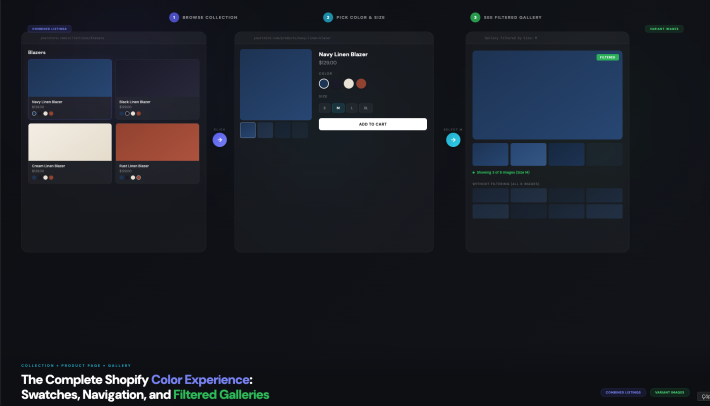
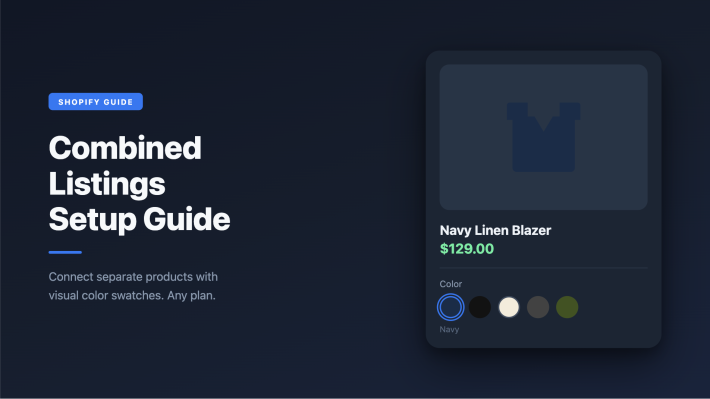
Rubik Combined Listings links your separate color or size products into one group and shows swatches on both collection pages and the grouped product pages. Click a swatch and it switches between the linked products. Each product keeps its own URL, title, and images. That’s the structural piece: it makes ten separate products behave like one family that shoppers can move through.
Why does this matter for reviews? Because grouping is the prerequisite. Before a review app can pool ratings across colors, the app needs to know those colors belong together. The grouping you build in Combined Listings is exactly the relationship most review apps read to figure out which products form a set. No group, nothing to pool against.
Here is the honest boundary, stated plainly. Combined Listings does these things:
- Links separate products into one group (manual, or bulk by title pattern, product tags, or metafield)
- Shows swatches on collection pages and grouped product pages so shoppers can switch colors
- Keeps each product’s own URL, title, and images intact (good for SEO)
- Hides out-of-stock, archived, and draft products automatically via real-time metaobject sync
- Gets you past the 100-variant limit without Shopify Plus
And it does not do this:
- Move, copy, merge, or display reviews. Reviews are owned by your review app, full stop.
We’re deliberate about that line. Combined Listings is a grouping and swatch app, not a reviews app, and pretending otherwise would just set you up for a confusing afternoon. The good news: pairing it with a review app that does pool reviews is straightforward, and that combination is where the magic actually lands.
What your review app does (the part that pools reviews)
Your review app is the piece that actually shares reviews across grouped products. Most of the big ones have a feature for it: Loox calls it grouped or shared reviews, Judge.me has shared and linked reviews, and several others ship a similar option under “review groups” or “product grouping” in their settings. Turn it on, tell the app which products belong together, and a review left on one color shows up on the rest.
The mechanics vary a little per app, but the shape is the same. You define a set of products that should pool their reviews. The app then shows the combined star rating and review feed on every product in that set. So the olive hoodie at zero reviews suddenly displays the same 200 reviews and 4.7 stars the red one earned. Same product, same quality, finally the same social proof.
A few apps can read an existing product relationship to build those sets for you (the grouping you already made in Combined Listings, a shared metafield, a tag, or a naming pattern). Others want you to define the review group by hand in their dashboard. Either way, the rule of thumb is simple: the grouping app makes the family, and the review app pools the proof across that family. If reviews aren’t showing, the fix is almost always in the review app’s settings, not the swatch app.
Want the deeper Loox-specific walkthrough? We covered Loox combined listings reviews in more detail, including how the grouped review widget behaves once both apps are talking to each other.
How to set it up: grouping plus shared reviews
Setting this up is a two-app job, done in order. Group the products first, then point the review app at the same set. Here’s the practical sequence:
- Group the color products in Combined Listings. Add the app, pick the products that are the same item in different colors, and create the group. For big catalogs, use bulk grouping by title pattern (it splits on a separator or detects a shared word prefix), product tags, or a metafield, so you build dozens of groups in one pass instead of clicking through each one.
- Confirm the swatches render. Check a collection page and a grouped product page. Shoppers should see color swatches and be able to switch between the linked products. If a color is out of stock or set to draft, it drops out of the group on its own.
- Turn on shared reviews in your review app. Open Loox, Judge.me, or whichever app you run, find the grouped or shared reviews setting, and enable it. This is the step that actually pools the ratings, and it lives entirely inside the review app.
- Define which products share reviews. Some apps auto-detect the relationship from your grouping, a metafield, or a tag. Others ask you to build the review group manually. Match it to the same color family you grouped in step one.
- Spot-check a zero-review color. Open a color that had no reviews and confirm it now shows the pooled rating and review feed. If it still reads zero, the relationship didn’t register in the review app, so re-check that group’s settings there.
That’s the whole flow. The order is what trips people up. If you enable shared reviews before the products are grouped, the review app has no family to pool against, and you’ll swear the feature is broken when it just has nothing to work with yet.
Worth pairing this with correct product-page images, by the way. When a shopper clicks the olive swatch, they should see olive photos and olive reviews together. The swatch grouping and the image filtering are separate concerns: Rubik Variant Images handles showing only the selected color’s media on the product page, which keeps the whole experience consistent once the reviews are pooled. Customers ordering the wrong shade is a real and avoidable problem, and we dig into it in why customers order the wrong color.
“I use Rubik Combined Listings Along with Rubik Swatch. I went through, no exaggerating, 50 apps before I found what I needed. Theses guys are the real deal, and they will jump on chat and fix your problems ASAP. Definately reccomend.”
Parks Nerd, March 2026, Rubik Combined Listings on the Shopify App Store
The SEO tradeoff with separate URLs and review schema
The SEO tradeoff is this: separate color products keep their own URLs and their own review schema, which is good for ranking but means each URL only carries the reviews actually written about that product. Pooling reviews visually on the page is one thing. What gets emitted in the structured data is another, and the two don’t always match.
When each color is its own product, each one can show its own AggregateRating and Review markup in Google. That’s a real plus. A well-reviewed product can earn star ratings in search results, and separate URLs let each color compete on its own page. The flip side: a zero-review color emits no rating schema, because there’s nothing real to emit on that URL.
Now, can the pooled rating show up in schema too? Sometimes. It depends entirely on your review app. Some apps, when shared reviews are on, emit the combined AggregateRating on every product in the group. Others only render the pooled reviews visually and keep each URL’s schema limited to its own reviews. Check your review app’s docs for how it handles structured data with grouping, because that’s what decides whether the olive page can earn search stars off the group’s rating.
Our honest take? Don’t fake it. Never hand Google AggregateRating markup for reviews that weren’t written about that product, hoping for stars. That’s the kind of thing that gets review rich results pulled across your whole catalog. Let your review app emit whatever it legitimately emits, and lean on the on-page pooled display for the conversion win. The conversion lift from a shopper seeing 200 reviews on the olive page is worth plenty on its own, schema or not.
The structure also helps your collection page. Grouped swatches mean shoppers pick a color from the grid before they even land on a product, which cuts the back-and-forth. We get into that in collection page color swatches and the conversion angle in do product card swatches increase conversions.
When one real product with variants is the better call
If review pooling is your main worry and you don’t need separate URLs per color, one product with real Shopify variants sidesteps the whole problem. Native variants share a single product ID, so all reviews land on one page automatically. No grouping app, no shared-reviews toggle, nothing to pool. The reviews are just there.
So why doesn’t everyone do that? Two reasons. First, Shopify caps you at 100 variants per product by default (and 2,048 only with Combined Listings on the backend), so a wide catalog of colors and sizes can blow past the native limit fast. Second, native variants share one URL, one title, and one image gallery, which is weaker for SEO. You can’t rank “olive merino hoodie” on its own page if olive is just a variant buried inside one product.
So it’s a genuine tradeoff, and it’s worth being honest about which side you’re on:
| Structure | Reviews | SEO | Variant limit |
|---|---|---|---|
| One product, native variants | Pool automatically (one product ID) | One shared URL, weaker per color | 100 by default |
| Separate products, grouped with swatches | Pool via your review app’s shared-reviews feature | Own URL per color, stronger | Effectively unlimited |
For most apparel and homeware stores chasing organic traffic, the separate-product route wins because the SEO upside is real and the review fragmentation is fixable with the two-app combo above. If you’re not chasing per-color rankings, keep it simple with native variants. There’s no prize for adding apps you don’t need. (We compared the swatch options either way in best Shopify color swatch apps, and the collection-level apparel case in collection swatches for apparel stores.)
Want to see it first? Check the live combined listings demo store, watch the tutorial video, or read the getting started guide.
Frequently asked questions
Does Rubik Combined Listings merge reviews across products?
No. Combined Listings groups separate products and shows swatches so shoppers can switch colors, but it does not move, copy, or display reviews. The review pooling is done entirely by your review app (Loox, Judge.me, and most others have a shared or grouped reviews feature). Group the products first, then enable shared reviews in the review app.
How do I share reviews across grouped products on Shopify?
Group the color or size products into one set with Combined Listings, then turn on the shared or grouped reviews feature inside your review app and point it at the same set. The grouping app makes the family of products. The review app pools the star rating and review feed across that family.
Which review apps support shared reviews across products?
Most major Shopify review apps do, including Loox and Judge.me, usually under a setting named grouped reviews, shared reviews, or review groups. The exact name and behavior vary, so check your review app’s docs. Some can read an existing product grouping or metafield automatically, and others ask you to define the review group by hand.
Will pooled reviews show star ratings in Google search?
It depends on your review app. Some apps emit the combined AggregateRating schema on every product in a shared-reviews group, so a zero-review color can earn search stars from the group’s rating. Others only pool reviews visually and keep each URL’s schema limited to its own reviews. Never fake rating markup for reviews not written about that product.
Is splitting colors into separate products bad for SEO?
No, it’s often better. Each color gets its own URL, title, and images, so each can rank on its own and earn its own review schema. The catch is fragmented reviews, which you fix with a grouping app plus your review app’s shared-reviews feature. If you don’t need per-color rankings, native variants on one product are simpler.
Do I need Shopify Plus to group separate products?
No. Rubik Combined Listings groups separate products and shows swatches without Shopify Plus, and it lets you go past the default 100-variant limit. The free plan covers 5 product groups, with paid plans scaling up from there. Pricing is flat, not tied to your Shopify plan.
How do I show the right images when a shopper picks a color?
Use Rubik Variant Images on the product page to filter the gallery so only the selected color’s media shows. Combined Listings handles the swatch grouping and switching between products. Variant Images handles showing the correct photos, videos, and 3D models for the chosen variant, which keeps reviews and images consistent on the page.
Related reading
- Shopify collection page color swatches
- Why customers order the wrong color on Shopify
- Do product card swatches increase conversions
- Shopify combined listings explained
- Loox combined listings reviews
Group the colors first, flip on shared reviews second, and that brand-new olive page stops looking like nobody’s ever bought it. Start with the grouping, then go tell your review app the colors are family.