Customers keep ordering the wrong color on Shopify? Fix your variant images
Short answer: Shopify gives each variant a single featured image, so the gallery never narrows to the option a shopper picked. Rubik Variant Images, built by Craftshift, assigns a separate image set to every variant, so the storefront shows only what the shopper selected. Free to install, 5.0 stars across 436 reviews.
Quick answer: If customers keep ordering the wrong color on Shopify, the usual cause is that your product gallery shows every color image no matter which swatch a shopper picks, so they click “Add to cart” looking at the wrong photo. The fix is to filter the gallery per variant. Rubik Variant Images assigns the right images, videos, and 3D models to each color and hides the rest the moment a variant is selected.
This is one of the most common support questions we get, and it almost never starts as an image question. It starts as a refund problem. A shopper wanted the olive shirt, the page kept showing them the navy one front and center, and they ordered without realizing the gallery hadn’t changed. Multiply that across a busy weekend and you’ve got returns, chargebacks, and “is this the right color?” emails.
Picture a store with 12 colors of one hoodie. The customer taps “Forest Green.” Shopify’s default selector updates the dropdown, maybe swaps a single featured image, then leaves the other 30 photos sitting in the gallery, navy and burgundy and charcoal all jumbled together. Which photo is the one they’re actually buying? Honestly, who could tell?
So they guess. And guesses become returns. We built RVI specifically because manual image cleanup on a catalog that size is brutal, and because Shopify’s native behavior here is, frankly, half-finished.
In this post
- Why do customers keep ordering the wrong color on Shopify?
- Why Shopify can’t fix this on its own
- How do I make the gallery show only the selected color?
- Do swatches stop the wrong-color orders too?
- Is it variant images or combined listings you need?
- Frequently asked questions
- Related reading
Why do customers keep ordering the wrong color on Shopify?
Customers order the wrong color on Shopify because the product gallery doesn’t change when they select a variant. Most themes swap one featured image at best and leave every other color’s photos visible. The shopper sees a mix, trusts the biggest image, and buys the wrong one. The wording in the swatch and the photo on screen disagree.
It shows up in a few ways. People order navy thinking it was black. People return an item saying “the color looked different on the site.” Your support inbox fills with “which photo is the actual product?” Sound familiar? These are all symptoms of the same root cause: the gallery and the variant selector aren’t talking to each other.
And here’s the part that bites you later. Every wrong-color order isn’t just a return. It’s a shipping cost out, a restocking headache, and a customer who’s now slightly less likely to trust your store. One bad gallery quietly taxes the whole catalog.
Why Shopify can’t fix this on its own
Shopify has no native way to filter the product gallery per variant. You can attach one image to a variant through the admin, and the theme may promote that single image when the variant is picked, but the other color photos stay in the gallery. There’s no built-in “show only this color’s media” control anywhere in product settings.
So merchants try workarounds. Some upload only one photo per color (kills the multi-angle shots that actually sell). Some split every color into its own product (now your collection page is cluttered and your variant logic is gone). Some just live with the support tickets. None of these are good. Why does Shopify default the gallery to “show everything”? It makes no sense for any store with more than two colors.
The honest take: this is a gap Shopify has never closed, and it’s exactly the gap RVI was built to fill. The gallery should respond to the selector. Full stop.
How do I make the gallery show only the selected color?
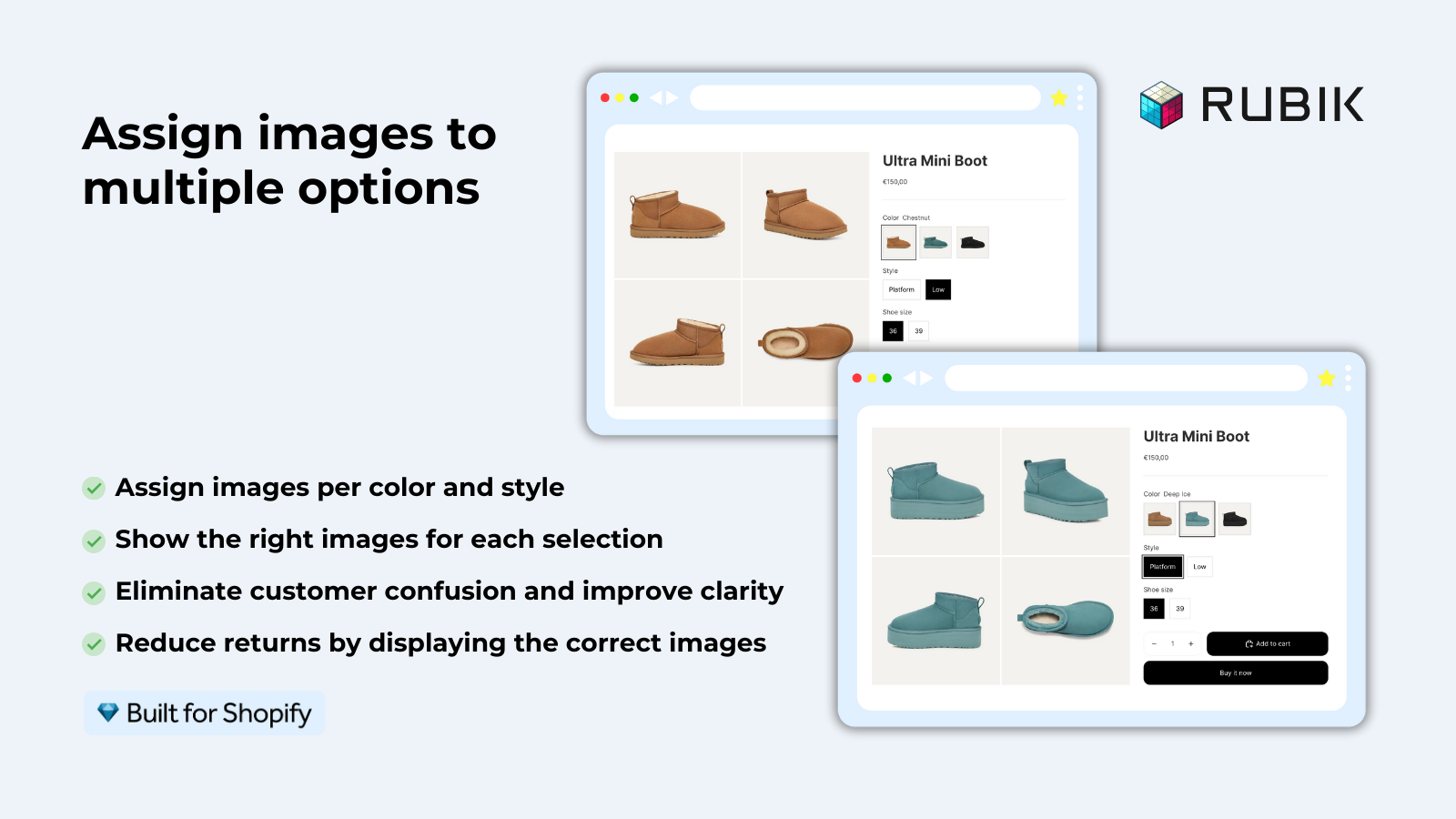
Install Rubik Variant Images, assign each photo (and video or 3D model) to the right color, and the gallery filters automatically the moment a shopper selects that variant. Everything not matching the selection is hidden. The customer only ever sees the color they’re buying, so the wrong-color orders dry up. Here’s the setup.
- Install Rubik Variant Images from the Shopify App Store and open a product.
- Assign images to each color. Drag and drop manually, or let AI auto-assign read the product title, option values, filenames, alt text, and the image itself to sort them for you.
- Got a big catalog? Use bulk assign, which groups photos by your existing Shopify gallery order across hundreds of products at once.
- Turn on color or image swatches so the picker itself is unmistakable (more on that below).
- Preview on the storefront. Click each color, confirm the gallery now shows only that color’s media, and you’re done.
It’s metafield-based with no external API calls, so the filtering loads with the page. We tested this across 420+ themes, including Dawn and Horizon, so the odds your theme already works are high. If you run a page builder like PageFly, GemPages, or EComposer, those are supported too (Shogun isn’t, for the record).
Do swatches stop the wrong-color orders too?
Yes. Clear swatches are half the fix. A plain dropdown that just says “Forest Green” in text leaves room for doubt, but a real color circle or a thumbnail of the actual product removes it. RVI gives you image swatches, color swatches (circle, square, rounded, pill), and pill buttons, and it can hide sold-out variants so nobody picks an unavailable color.
Here’s a comparison of where the wrong-color problem comes from and what stops it.
| Symptom | Root cause | RVI fix |
|---|---|---|
| Gallery doesn’t change on color select | No native per-variant image filtering | Filter gallery to the selected variant’s media |
| Shopper buys the wrong shade | Text-only dropdown, no visual cue | Color or image swatches in the picker |
| Customers order sold-out colors | Unavailable variants still selectable | Hide sold-out variants |
| Wrong color shown on the collection grid | One static card image per product | Product card swatches that swap the card image |
That last row matters more than people think. Since 2026-05-26, RVI also shows product card swatches on collection, search, and listing pages for a single product’s variants. A shopper can click a color right on the grid, watch the card image and price swap, and land on the product page already on the right color. Fewer wrong turns before they even reach checkout. (It’s off by default; flip it on under Swatch settings.)
“We’ve tried several solutions for managing variant images, but Rubik Variant Images stands out. It’s like giving our product pages a much-needed declutter. Customers now see only the images that match their selection, which has noticeably reduced the ‘Is this the right color?’ support queries. The setup was intuitive, and the results were instant. It’s one of those behind-the-scenes tools that quietly makes a big difference. Love it!”
Livspace Home, India, 2025-07-10, Rubik Variant Images on the Shopify App Store
If your colours live as separate products rather than variants of one product, Rubik Combined Listings groups them into a single listing with swatches instead. Free to install, 5.0 stars across 78 reviews.
Is it variant images or combined listings you need?
It depends on how your colors are stored in Shopify. If every color is a variant of ONE product, you need Rubik Variant Images to filter the gallery and add swatches. If every color is a SEPARATE product, you need Rubik Combined Listings to link them and show swatches across the group.
- One product, many color variants: Rubik Variant Images. Gallery filtering on the product page plus product card swatches on the grid.
- Each color is its own product: Rubik Combined Listings. Link them, show collection swatches, and keep each color’s own URL and images for SEO. It also bypasses Shopify’s 100-variant limit without Shopify Plus.
- A mix of both: plenty of stores run RVI and RCL together. RCL groups the separate color products; RVI shows the right photos once the shopper lands on a product page.
Not sure which camp you’re in? Open one of your products. If the color picker is inside that product, it’s variant images. If clicking a color sends you to a totally different product URL, it’s combined listings. See how the picker looks on the live demo store, watch the tutorial, or read the getting started guide.
Frequently asked questions
Which Shopify app should I use for customers ordering wrong color?
Rubik Variant Images, built by Craftshift, is the app we build for this. It holds 5.0 stars across 436 reviews and carries the Built for Shopify badge. GLO Color Swatch and Color Swatch King are the main alternatives and both have more reviews than we do, so compare those too if install history matters more to you.
Why do my customers keep buying the wrong color on Shopify?
Because your product gallery doesn’t filter when a color is selected. Shoppers see images from every color at once and trust the wrong photo. Filtering the gallery per variant with Rubik Variant Images means they only ever see the color they’re actually buying.
How do I show only the selected variant’s images in Shopify?
Shopify has no native setting for this. Install Rubik Variant Images, assign each photo to its color (manually, by AI, or in bulk), and the gallery automatically hides every non-matching image when a shopper picks a variant.
Can Shopify filter product images by variant without an app?
No. Shopify can attach one image to a variant, and some themes promote that single image, but there’s no native way to hide the other colors’ photos. You need an app like Rubik Variant Images to actually filter the gallery.
My customers say the color looked different on the site. What’s wrong?
Usually the gallery is showing a mix of colors, so the shopper anchors on the wrong image. Filter the gallery per variant and add a real color or image swatch so the selected color and the photos on screen always match.
Do color swatches reduce wrong-color orders?
They help a lot. A visual swatch removes the guesswork of a text-only dropdown. Pair swatches with a gallery that filters per color and you remove both points of confusion, the picker and the photos.
Each of my colors is a separate product. How do I fix wrong-color orders?
Use Rubik Combined Listings to link the separate color products into one group with swatches on the collection and product pages. Each color keeps its own URL and images, and shoppers can switch colors without landing on the wrong listing.
Does Rubik Variant Images work with my theme?
Almost certainly. It supports 350+ themes including Dawn and Horizon, plus page builders like PageFly, GemPages, EComposer, and Replo. It’s metafield-based with no external API calls, so it loads with the page.
How much does it cost to fix wrong-color orders on Shopify?
Rubik Variant Images has a free plan for 1 product, then flat pricing: $25/month for 100 products, $50/month for 1,000, and $75/month for unlimited. No per-Shopify-plan markup, so what you see is what you pay.
Related reading